

Governance Tour
This is a self-serve, ~30-minute tour of Brutor’s governance controls. You will build a small governed environment from scratch, then deliberately violate every control you set — and watch each decision arrive in the logs and Mission Control.
What you’ll set up, in order:
- A resource group — the unit of governance
- A model binding — what the group may call
- A user-group binding and an API key — who may call it
- A daily token budget and an RPM limit
- A PII guardrail that blocks on
chat_input
Every step shows both the Admin Console clickpath and the equivalent Admin API call, so you can replay the whole tour as a script later (see setup scripts).
This is the pipeline you are about to exercise. Each control you configure below is one of the gates on the top row — and each violation you trigger is one of the stop boxes:
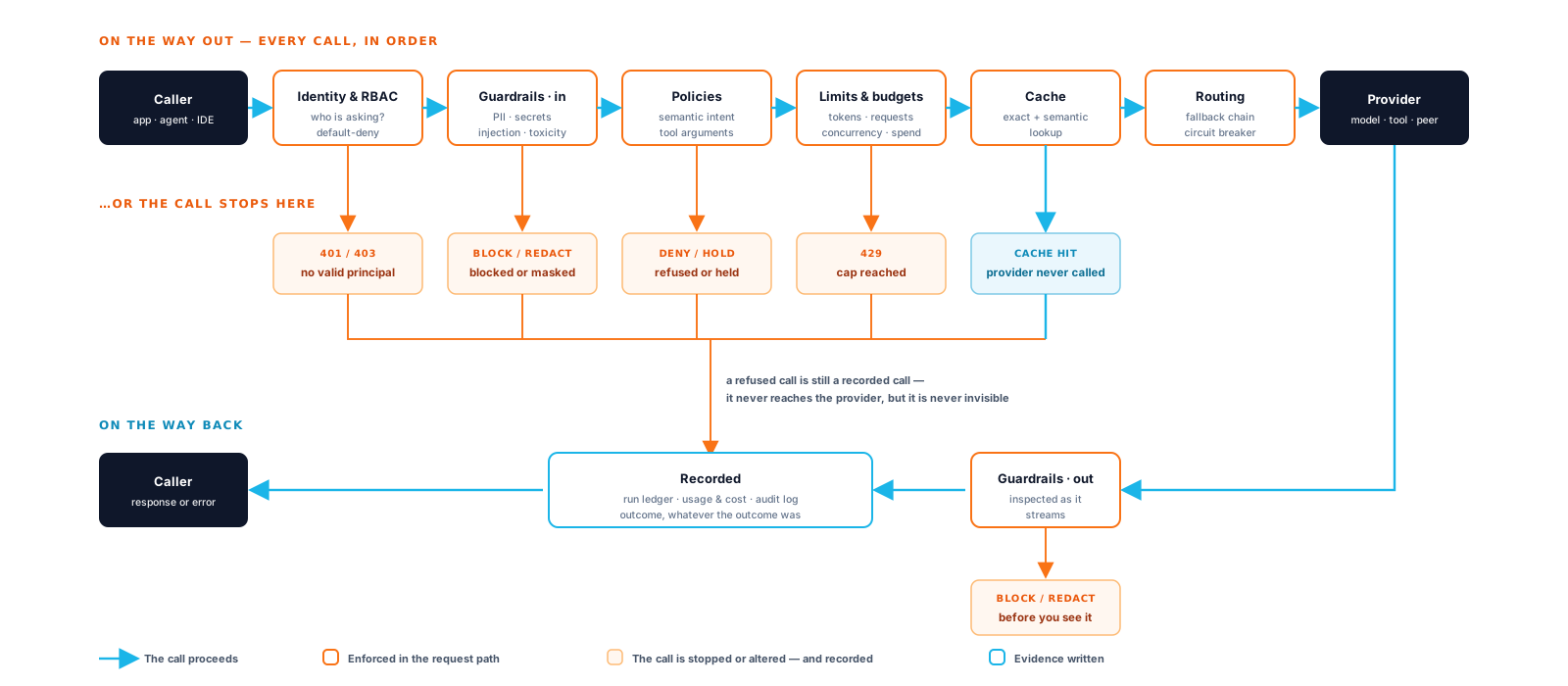
A refused call never reaches the provider, but it is never invisible either — by the end of the tour you will have produced several of those refusals yourself and found each one in the proxy logs.
Prerequisites: a running gateway (quickstart) with a provider API key configured on at least one enabled model, and the seeded admin login.
Step 0 — Get an admin token
Section titled “Step 0 — Get an admin token”Everything below uses the Control Plane admin API on :5050. Log in once and reuse the bearer token:
curl -s http://localhost:5050/v1/admin-users/tenant/login \ -H "Content-Type: application/json" \ -d '{"username": "admin", "password": "Admin123!", "tenant_id": "default"}'{ "access_token": "eyJhbGciOiJIUzI1NiIsInR5cCI6IkpXVCJ9...", "token_type": "bearer", "expires_in": 3600, "admin": { "username": "admin", "...": "..." }, "session_id": "..."}export TOKEN="eyJ..." # the access_token valueexport CP=http://localhost:5050-
Create a resource group.
A resource group bundles resources (models, MCP servers, skills), the people allowed to use them, and the limits and policies that apply. Governance in Brutor always hangs off a resource group.
Admin Console: Resource Groups → New Group → name it
gov-tour, type team → Create Group.API:
Terminal window curl -s -X POST $CP/v1/admin/resource-groups \-H "Authorization: Bearer $TOKEN" -H "Content-Type: application/json" \-d '{"name": "gov-tour","display_name": "Governance Tour","description": "Scratch group for the governance tour","group_type": "team","inherit_resources": false}'{"id": "3f9c2c6e-...-...","name": "gov-tour","display_name": "Governance Tour","group_type": "team","parent_group_id": null,"hierarchy_level": 0,"inherit_resources": false,"...": "..."}Terminal window export RG="3f9c2c6e-..." # the id value -
Add a model to the group.
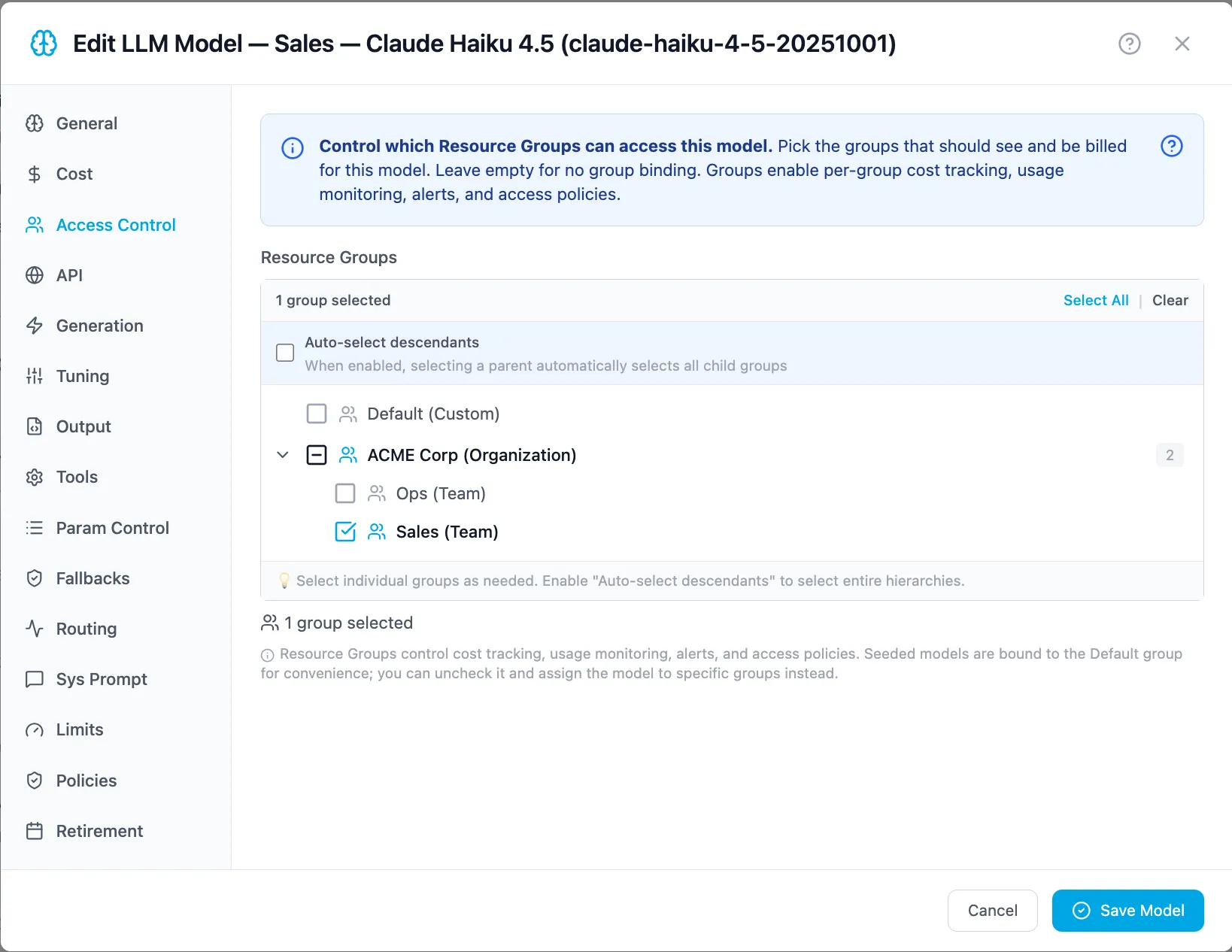
A resource group starts with access to nothing. Access is granted on the model, not on the group — the group’s own Resources → AI Models tab only lists what is bound to it (its Add Models button opens these instructions).
Admin Console: Resources → AI Models → Configuration.
- Model already enabled: Edit it → Access Control → add Governance Tour → save.
- Model not enabled yet: Browse Catalog → Enable the one you want → set its API Key → then Edit → Access Control → add Governance Tour.
API:
Terminal window curl -s "$CP/v1/admin/llms?mode=chat" -H "Authorization: Bearer $TOKEN"{"models": {"b71a...-...": { "id": "b71a...-...", "name": "OpenAI GPT-5.2 Auto-Routing", "model_name": "gpt-5.2", "enabled": true, "...": "..." }},"total": 1}Terminal window export MODEL_ID="b71a..."curl -s -X POST $CP/v1/admin/resource-groups/$RG/llm-models \-H "Authorization: Bearer $TOKEN" -H "Content-Type: application/json" \-d "{\"llm_model_id\": \"$MODEL_ID\"}"Returns
201 Created(or409if the binding already exists — bindings are idempotent to re-assert). -
Bind a user group.
API keys give programmatic access; end-user groups give people access (portal login, user-bound keys). Bind the trial user via a fresh end-user group.
Admin Console: Users → User Groups → New User Group → name it
tour-usersand add the membertrial. Then Resource Groups → Governance Tour → Members → Bind User Group and picktour-users.API:
Terminal window # find the seeded trial user's idcurl -s "$CP/v1/admin/end-users?search=trial" -H "Authorization: Bearer $TOKEN"# create an end-user group containing themcurl -s -X POST $CP/v1/admin/end-user-groups \-H "Authorization: Bearer $TOKEN" -H "Content-Type: application/json" \-d '{"name": "tour-users","display_name": "Tour Users","description": "Users taking the governance tour","initial_member_ids": [42]}'{ "id": "7d2e...-...", "name": "tour-users", "...": "..." }Terminal window # bind the end-user group to the resource groupcurl -s -X POST $CP/v1/admin/resource-groups/$RG/end-user-groups \-H "Authorization: Bearer $TOKEN" -H "Content-Type: application/json" \-d '{"end_user_group_ids": ["7d2e..."]}' -
Create an API key for the group.
Admin Console: Resource Groups → Governance Tour → API Keys → Create Key.
API:
Terminal window curl -s -X POST $CP/v1/admin/resource-groups/$RG/api-keys \-H "Authorization: Bearer $TOKEN" -H "Content-Type: application/json" \-d '{"name": "tour-key", "access_mode": "shared"}'{"id": "9a1f...-...","key_value": "sk_brutor_api_XXXXXXXXXXXXXXXXXXXXXXXXXXXXXXXXXXXXXXXXXXX","key_prefix": "sk_brutor_api_XXXX","name": "tour-key","scope": "global","access_mode": "shared","group_id": "3f9c2c6e-...","enabled": true,"...": "..."}key_valueis shown only in this response — capture it now.Terminal window export KEY="sk_brutor_api_..." -
Set a daily token budget and an RPM limit.
Deliberately tiny values so you can trip them in minutes: 2,000 tokens per day, 3 requests per minute.
Admin Console: Resource Groups → Governance Tour → Governance → Limits.

API (this PATCH replaces the whole
llm_global_limitsdocument — always send the full desired state):Terminal window curl -s -X PATCH $CP/v1/admin/resource-groups/$RG/llm-global-limits \-H "Authorization: Bearer $TOKEN" -H "Content-Type: application/json" \-d '{"llm_global_limits": {"tokens": { "daily_limit": 2000 },"throughput": { "max_requests_per_minute": 3, "cooldown_seconds": 60 }}}'The response echoes the stored limits document.
-
Attach a PII guardrail.
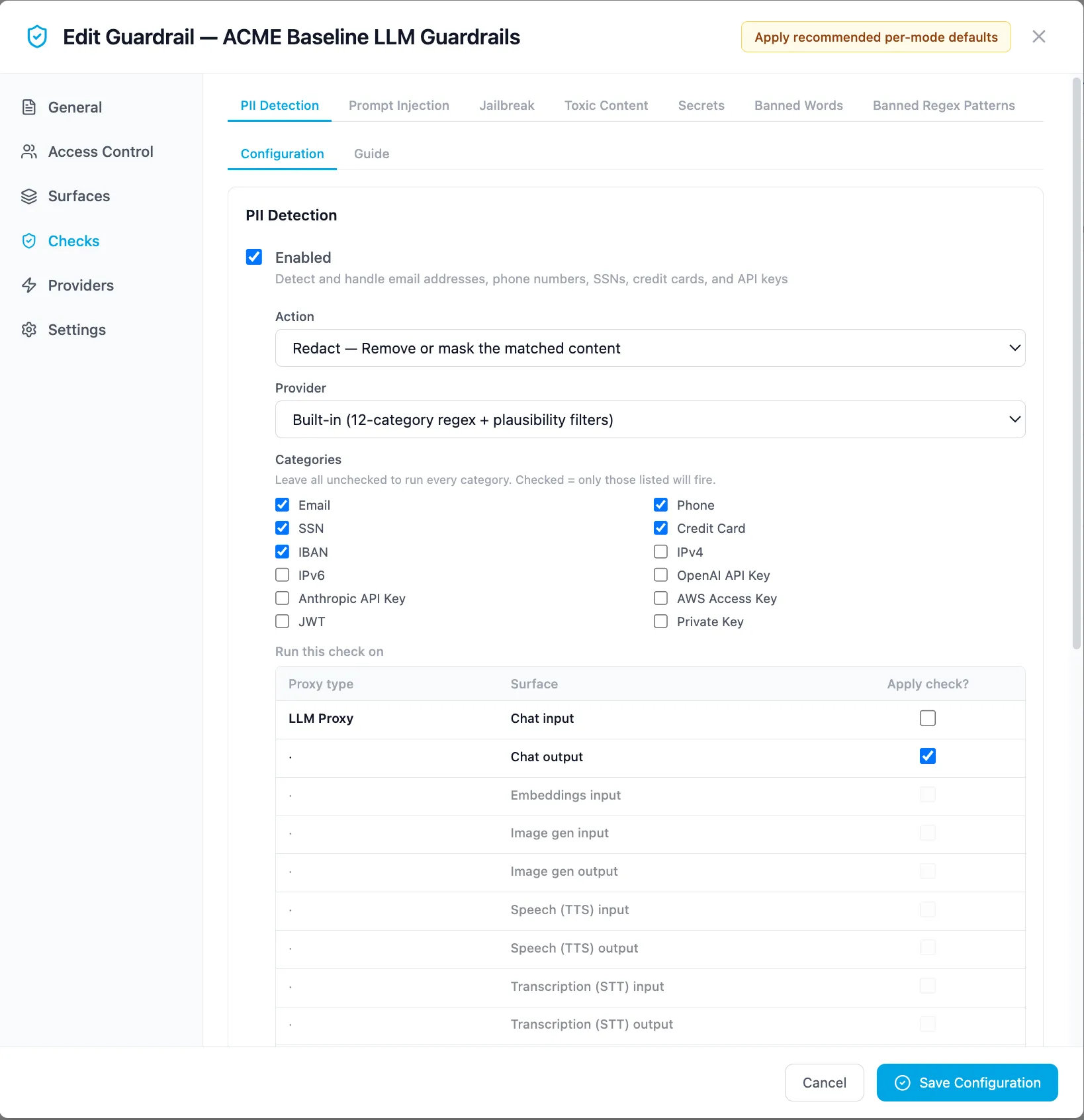
Create a guardrail config that blocks requests containing emails or SSNs on the
chat_inputsurface, bound to your group.Admin Console: Governance → Guardrails → New Config → enable PII detection, action block, categories email and ssn, surface chat input, and on Access Control assign the Governance Tour group.
API:
Terminal window curl -s -X POST $CP/v1/admin/guardrails/configs \-H "Authorization: Bearer $TOKEN" -H "Content-Type: application/json" \-d '{"name": "tour-pii-block","description": "Block email/SSN in prompts","enabled": true,"group_ids": ["'$RG'"],"surfaces": { "chat_input": true },"builtin": {"pii_enabled": true,"pii_action": "block","pii_categories": ["email", "ssn"],"pii_surfaces": ["chat_input"]}}'{ "id": "c4d8...-...", "name": "tour-pii-block", "enabled": true, "...": "..." } -
Trip the guardrail.
Send a prompt containing PII through the new key:
Terminal window curl -s http://localhost:8100/v1/proxy/llm/chat/completions \-H "Authorization: Bearer $KEY" -H "Content-Type: application/json" \-d '{"model": "gpt-5.2","messages": [{"role": "user", "content": "Email the report to jane.doe@example.com please"}]}'The request never reaches the provider — 403 Forbidden:
{"error": {"code": "guardrail_blocked","message": "guardrail hit on `email` (1 match)","guardrail": "tour-pii-block","check": "pii","direction": "input"}} -
Trip the RPM limit.
Fire four clean requests inside one minute — the fourth exceeds
max_requests_per_minute: 3:Terminal window for i in 1 2 3 4; docurl -s -o /dev/null -w "request $i → %{http_code}\n" \http://localhost:8100/v1/proxy/llm/chat/completions \-H "Authorization: Bearer $KEY" -H "Content-Type: application/json" \-d '{"model": "gpt-5.2", "messages": [{"role": "user", "content": "Say ok."}]}'donerequest 1 → 200request 2 → 200request 3 → 200request 4 → 429The
429body names the limit and scope, and the response carries aRetry-Afterheader (here, your 60-second cooldown):{"error": {"type": "rate_limit_exceeded","message": "LLM rate limit exceeded at group scope (3 requests/min) — retry in 60s","scope": "group","limit_type": "rpm"}} -
Trip the daily token budget.
After the cooldown, send a few longer requests (e.g. “write 300 words about…”) until the group’s daily total passes 2,000 tokens. The next request is refused with
limit_type: "daily_tokens":{"error": "Daily token limit exceeded: 2143 / 2000","usage_limit": {"group_id": "3f9c2c6e-...","group_name": "gov-tour","limit_type": "daily_tokens","current_usage": "2143","max_limit": "2000"}}For daily limits the
Retry-Afterheader counts down to the next UTC midnight, when the window resets. And before it blocks, watch the warning arrive: run a request withcurl -ionce you’re past 85% of the budget and you’ll see anX-Usage-Warningresponse header. -
Watch the decisions land.
Open the Admin Console:
- Mission Control → Overview shows the gov-tour card with its spend and runs; Mission Control → Analytics → Governance shows the guardrail blocks and policy decisions for the period, and Analytics → Cost the tokens and dollars your tour just burned, attributed to gov-tour.
- Operations → Logs & Audit → Proxy Logs shows every request — including the
403guardrail block (with the check that fired) and the429s — each with a correlation ID you can match to theX-Correlation-Idheader your client received.

Audit logs record the admin actions from this tour too — every group, key, limit and guardrail you created. See the observability tour for the full read-side story.
-
Clean up.
Terminal window curl -s -X DELETE $CP/v1/admin/guardrails/configs/c4d8... -H "Authorization: Bearer $TOKEN"curl -s -X DELETE $CP/v1/admin/resource-groups/$RG -H "Authorization: Bearer $TOKEN"curl -s -X DELETE $CP/v1/admin/end-user-groups/7d2e... -H "Authorization: Bearer $TOKEN"Deleting the resource group revokes its API keys and bindings; the trial user itself is untouched.
What you now know
Section titled “What you now know”Every control you tripped — the 403 guardrail_blocked, the 429 with Retry-After, the token-budget refusal — was enforced inline by the core proxy, attributed to a resource group, and recorded with a correlation ID. That is the whole governance model in miniature: resource groups carry the policy, the gateway enforces it, the ledger remembers it.