

Argument & Semantic Policies
Guardrails look at content. Policies look at behavior: what a tool call is actually about to do. Brutor has two policy engines:
| Argument policies | Semantic policies | |
|---|---|---|
| Mechanism | Deterministic analyzers (SQL parser, URL/shell/path/JSON inspection) | LLM judge evaluating a natural-language constraint |
| Latency / cost | Microseconds, free | One judge-model call per evaluated request |
| Determinism | 100% reproducible | Model judgment — use shadow mode first |
| Best for | “No writes to the sales DB”, “no requests to private IPs” | “Agents must never commit to pricing or discounts” |
Use argument policies wherever the rule can be expressed structurally. Reach for semantic policies when the rule lives in meaning, not syntax.

Argument policies
Section titled “Argument policies”An argument policy targets one argument of one tool (or all tools) on a surface, runs a deterministic analyzer over the value, and denies or warns based on rules.
Fields: name, description, surface (llm_output_tool_calls | mcp_input | skill_input), target (tool/skill name, or "*"), argument_key (which JSON argument to analyze, or "*" for the whole argument object), analyzer (sql | url | shell | path | json), rules, severity (deny | approval_required | warn), enabled, group_ids (resource-group binding).
llm_output_tool_calls inspects tool calls the LLM proposes in its output (before your agent executes them); mcp_input and skill_input inspect calls arriving at the MCP/skill gateway.
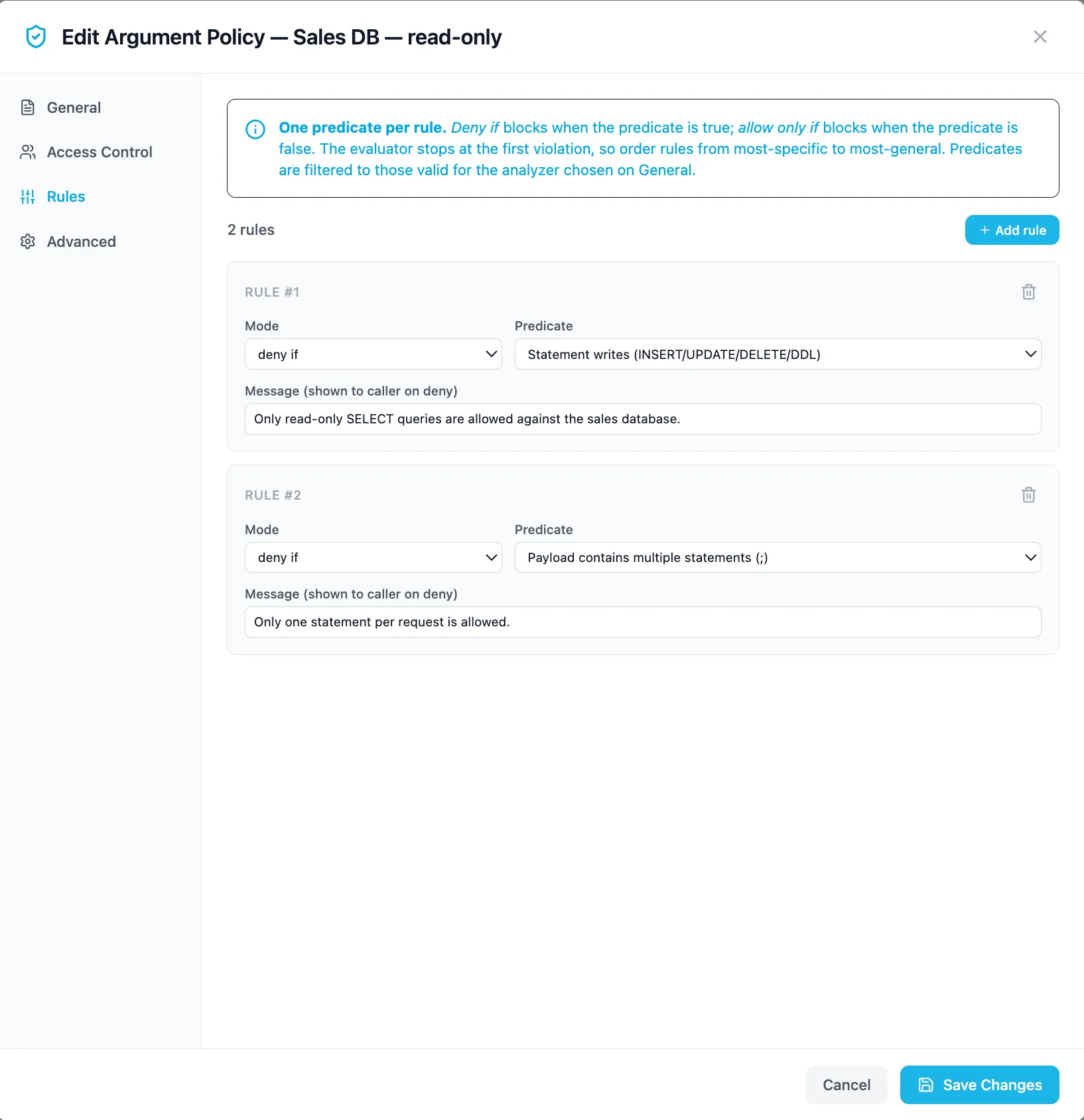
Example: read-only SQL tool
Section titled “Example: read-only SQL tool”curl -X POST http://localhost:5050/v1/admin/argument-policies \ -H "Authorization: Bearer $ADMIN_TOKEN" \ -H "Content-Type: application/json" \ -d '{ "name": "sales-db-read-only", "description": "The sales DB tool may only run single read statements", "surface": "llm_output_tool_calls", "target": "query_sales_db", "argument_key": "sql", "analyzer": "sql", "severity": "deny", "enabled": true, "rules": [ { "deny_if": "writes", "message": "Write statements are not allowed on the sales DB" }, { "deny_if": "multi_statement", "message": "One statement per call" }, { "deny_if": "touches_any", "values": ["salaries", "employees_pii"], "message": "Restricted tables" } ], "group_ids": ["9f2c..."] }'A denied call is rejected before execution and logged with argument_policy_denied = true in the proxy logs. With severity: "warn" the call proceeds but the violation is recorded. With severity: "approval_required" the call is held for a human through the approval queue instead of being refused.
Bands: allow, approve, deny by value
Section titled “Bands: allow, approve, deny by value”A threshold is the control most people reach for first — transfers over £1,000 need a human. Express it as ordered rules with per-rule severity. Rules are evaluated in order and the first match wins, so ordering is the band: put the tightest threshold first, or the looser rule above it makes it unreachable.
curl -X POST http://localhost:5050/v1/admin/argument-policies \ -H "Authorization: Bearer $ADMIN_TOKEN" \ -H "Content-Type: application/json" \ -d '{ "name": "payments-threshold", "surface": "mcp_input", "target": "transfer_funds", "argument_key": "*", "analyzer": "json", "analyzer_config": { "schema": { "required": ["amount"] } }, "severity": "warn", "rules": [ { "deny_if": "schema_invalid", "severity": "deny", "message": "transfer_funds called without an amount" }, { "deny_if": "field_gt", "field": "amount", "value": 10000, "severity": "deny", "message": "Transfers over 10,000 are not permitted from this system" }, { "deny_if": "field_gt", "field": "amount", "value": 1000, "severity": "approval_required", "message": "Transfers over 1,000 require approval" } ] }'Three details make this safe rather than decorative.
argument_key is "*". Comparison rules address fields by dotted path inside the argument object (amount, transfer.amount, items.0.qty), so the analyzer has to see the object. Naming a single key analyzes only that argument and the paths never resolve; the API refuses that combination.
The presence rule comes first, and is not optional. A comparison predicate reading a missing field does not hold, and a rule that does not hold does not deny — so an agent calling transfer_funds({}) with no amount would walk straight past a bare threshold. The API refuses to save a policy whose compared path is not covered by either a schema.required entry paired with a schema_invalid rule, or an explicit field_present rule. A policy that looks enforced and is not is worse than no policy.
Quoted numbers still compare. Models routinely emit {"amount": "8000.00"}. A string that parses as a finite number is compared as one; set analyzer_config: {"strict_numbers": true} to refuse the coercion instead. NaN and infinities never compare.
The approval entry tells the approver why: which policy tripped, on which field, the observed value and the threshold. The issued token is bound to the arguments the approver saw, so approving 8,000 cannot be replayed as 80,000.
The JSON analyzer flattens the argument object under hard caps — depth 8, 512 leaves, 64 array elements per level — because it runs on every matching call. Hitting a cap sets json_truncated.
Rule predicates by analyzer
Section titled “Rule predicates by analyzer”Rules are {deny_if | allow_only_if, values?, field?, value?, severity?, message?}. Predicates marked * require values; those marked † require field (a dotted path) and value.
| Analyzer | Predicates |
|---|---|
sql |
writes, multi_statement, statement_type_in, statement_type_not_in, touches_any, touches_none_of, subquery_depth_gt* |
url |
host_in_private_range, scheme_in, scheme_not_in, host_in, host_not_in |
shell |
command_in, command_not_in, flag_present, flag_not_present |
path |
traverses_parent, absolute_required, inside_root, outside_root |
json |
schema_invalid, field_present, field_not_present, field_gt†, field_gte†, field_lt†, field_lte†, field_eq†, field_ne†, field_in, field_not_in |
Policies can be exported and versioned as YAML: GET /v1/admin/argument-policies/export.yaml / POST /v1/admin/argument-policies/import.yaml. Group bindings are set with PATCH /v1/admin/argument-policies/{id}/groups.
Semantic policies
Section titled “Semantic policies”A semantic policy is a natural-language constraint enforced by an LLM judge. The gateway sends the request content plus your constraint_text to a judge model and blocks or warns based on the verdict.
Fields: name, description, constraint_text (the natural-language rule), action (block | warn), mode (shadow | enforce), surfaces (any of chat_input, mcp_input, a2a_inbound, a2a_outbound, skill_input), judge_model_id (a specific model to judge with; null = tenant default), enabled, resource_group_ids.
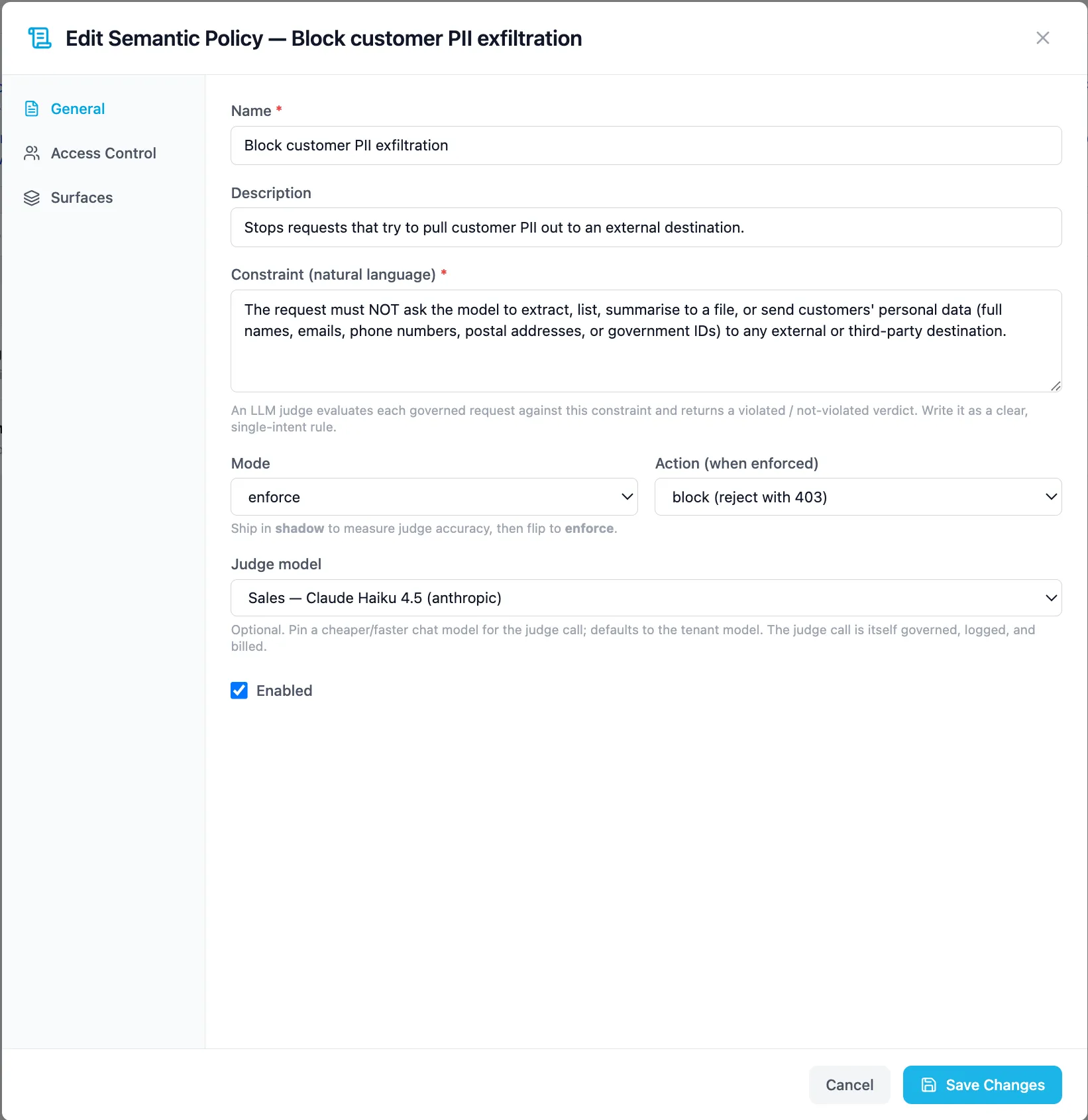
Scope: when resource_group_ids is empty or omitted, the policy is tenant-wide; otherwise it applies only to the listed resource groups.
Which model judges
Section titled “Which model judges”The judge is resolved in this order, and every tier is an explicit operator choice:
judge_model_idon the policy — pin a specific model for this rule.- The tenant default — Settings → Tenant → Default models. Set automatically at tenant provisioning (override the seeded pick with
DEFAULT_JUDGE_MODEL), preferring a cheap, fast chat model. JUDGE_MODEL— the deployment-level floor, mirroringEMBEDDING_MODELfor the semantic cache.
If none resolves, the policy has no judge and does not enforce, and the gateway raises a system alert saying so (see below).
curl -X POST http://localhost:5050/v1/admin/semantic-policies \ -H "Authorization: Bearer $ADMIN_TOKEN" \ -H "Content-Type: application/json" \ -d '{ "name": "no-pricing-commitments", "description": "Customer-facing agents must never commit to pricing", "constraint_text": "The request must not ask the assistant to quote, promise, or negotiate prices, discounts, or contractual terms on behalf of the company.", "action": "block", "mode": "shadow", "surfaces": ["chat_input", "a2a_inbound"], "enabled": true, "resource_group_ids": [] }'{ "id": "smp-...", "name": "no-pricing-commitments", "action": "block", "mode": "shadow", "surfaces": ["chat_input", "a2a_inbound"], "enabled": true}Shadow → enforce rollout
Section titled “Shadow → enforce rollout”Never launch a semantic policy directly in enforce mode. The judge is a model; you want evidence of its judgment on your traffic first.
-
Create in
mode: "shadow". The judge runs on live traffic and records would-block decisions (proxy_subtype = semantic_policy_shadowin the proxy logs) — nothing is actually blocked. -
Review shadow hits in the Governance view and the proxy logs for a few days. Tighten
constraint_textuntil false positives are acceptably rare. A more capablejudge_model_idoften beats a longer constraint. -
Flip to
mode: "enforce"withPATCH /v1/admin/semantic-policies/{id} {"mode": "enforce"}. Blocks now return errors to callers and log assemantic_policy_block. -
Keep
action: "warn"as a middle ground — enforce mode, but violations only log and alert rather than block.
Choosing between the engines
Section titled “Choosing between the engines”- Rule mentions a table, host, path, flag, or field → argument policy. It’s free, instant, and never hallucinates.
- Rule mentions intent, topic, or tone (“no legal advice”, “no competitor disparagement”) → semantic policy, rolled out through shadow mode.
- Many real controls use both: an argument policy guarantees the SQL is read-only, while a semantic policy watches for the agent being talked into exfiltration-shaped requests.
Policy denials and shadow hits are first-class governance events: they appear in Mission Control → Governance, in the audit trail, and count toward compliance tagging where a profile is enabled.