

Your First Governed LLM Call
This walkthrough starts where the trial install ends: all containers are up and nothing is configured yet. In about five minutes you will:
- Add your OpenAI API key to the model the trial seeds, and check that the model is healthy.
- Log in to the User Portal as the seeded trial user and send your first chat.
- Create an API key on the Default resource group and call the Core Proxy from the command line.
Every one of these calls goes through Brutor, the AI control plane. Each one is checked against its resource group’s access rules, guardrails and limits, and is metered and logged. That record is what Brutor later uses to assure an AI System against its contract.
What the trial gives you
| Thing | Value |
|---|---|
| Admin Console | http://localhost:3002. Log in as a Tenant Admin, tenant ID default, username admin, password Admin123! |
| User Portal | http://localhost:3001. Username trial, password Trial123! |
| Core Proxy (all runtime traffic) | http://localhost:8100 |
| Resource group | Default. A system group that every seeded model is bound to |
| Chat model | OpenAI GPT-5.2 Auto-Routing (gpt-5.2), provider OpenAI, enabled, with no API key |
1. Add your provider API key
Section titled “1. Add your provider API key”
Watch Managing AI Models shows this step and more: connecting providers, adding models from the built-in catalog, setting API keys, tuning defaults, and assigning each model to the resource groups whose teams should reach it.
The trial seeds OpenAI models as enabled and binds them to the Default group, but it cannot ship your OpenAI key. Until you add one, the models are reachable through Brutor but the provider rejects every call.
-
Open the Admin Console at http://localhost:3002. Choose Tenant Admin, then enter tenant ID
default, usernameadminand passwordAdmin123!. -
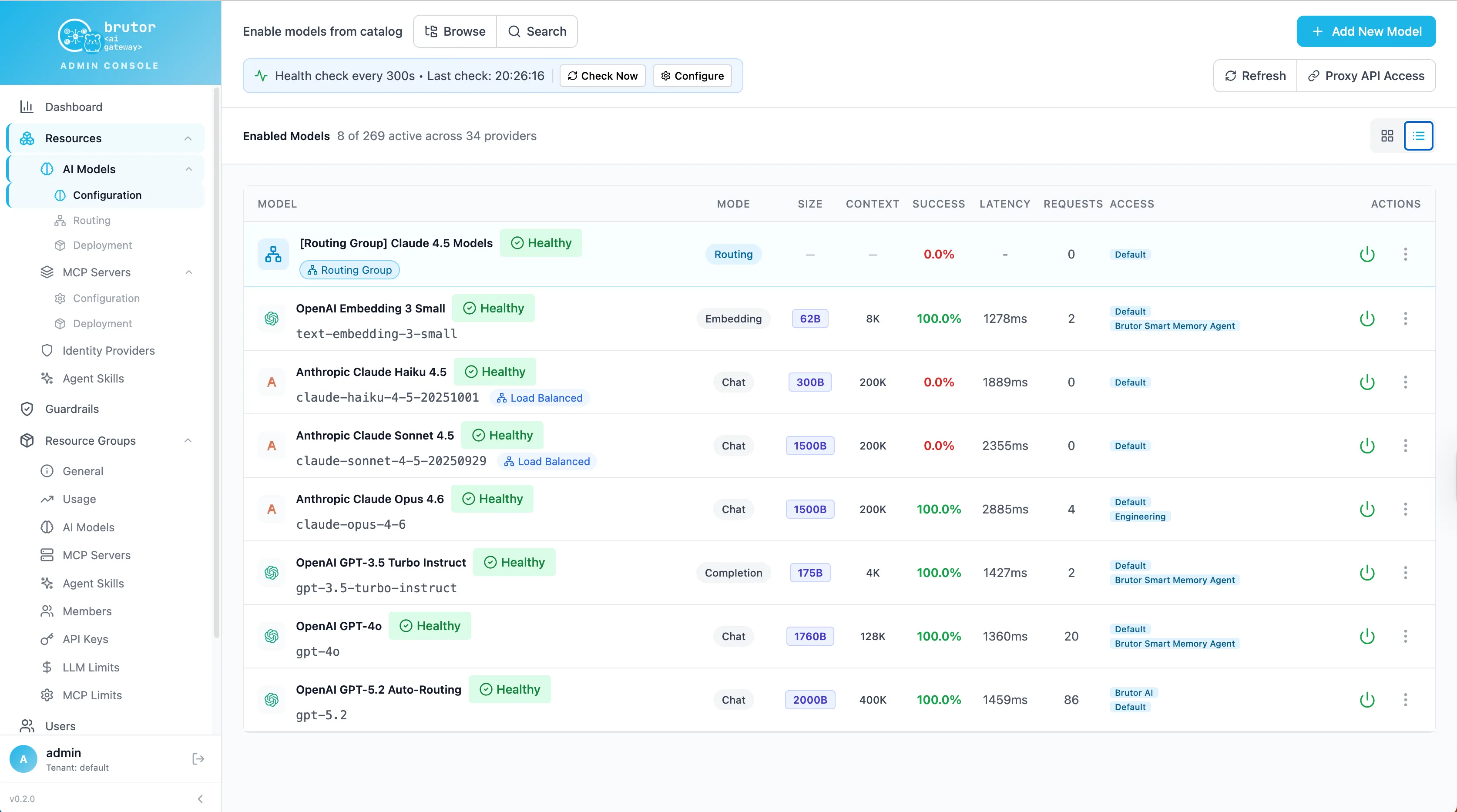
In the sidebar, go to Resources → AI Models → Configuration. The list shows the enabled models. Open the ⋮ menu on OpenAI GPT-5.2 Auto-Routing (
gpt-5.2) and choose Edit. -
In the edit dialog, open the API tab. Leave Authentication Type set to API Key, paste your OpenAI key (
sk-...) into the API Key field, and click Save Model. The key is encrypted at rest and is never returned to the browser. -
Repeat this for any other OpenAI model you plan to use. Each model stores its own key. For example, text-embedding-3-small needs the key before the Knowledge Base and semantic cache can embed text with it.
-
Check the model’s health. The bar at the top of the Configuration page shows the health-check schedule. Click Check Now to run it straight away. The model’s badge should change to Healthy. To test one model on its own, open its ⋮ menu and choose Test Connection.
2. Chat in the User Portal as the trial user
Section titled “2. Chat in the User Portal as the trial user”On a fresh database, the trial creates one portal user and adds them as a member of the Default group:
- Username:
trial - Password:
Trial123! - Display name: Trial User
- Group: Default (its only membership)
What Default grants. Default is the system resource group that every seeded model is bound to. Its description says that models in Default are available to all users. Remove a model from Default to limit it to specific groups. Besides gpt-5.2, the trial seeds these enabled models in Default:
gpt-5.5, a Responses-API modelopenrouter/autotext-embedding-3-smallandnomic-embed-text, embedding modelsgpt-image-2,tts-1andwhisper-1, for image, speech and transcription- one fal.ai video model
Each of these works only after its provider key is set. To see exactly what the group grants, go to Resource Groups → Default → Resources → AI Models.
-
Open the User Portal at http://localhost:3001. The trial’s portal is already set to tenant
default. -
Sign in with Username
trialand PasswordTrial123!. -
In Chat, pick OpenAI GPT-5.2 Auto-Routing in the model picker if it isn’t already selected, and send a message. For example: “In one sentence, why route LLM calls through a gateway?”
The portal has no direct path to OpenAI. It sends each chat turn to the Core Proxy at POST /v1/proxy/llm/chat/completions, using the trial user’s portal session. So the chat follows the same rules as any other caller. It is attributed to user trial in group Default, checked against Default’s model bindings, guardrails and limits, and recorded. You’ll find it in Operations → Logs & Audit → Proxy Logs and in the Usage tab of Resource Groups → Default.
3. Call the Core Proxy with a Default-group API key
Section titled “3. Call the Core Proxy with a Default-group API key”Agents, scripts and CLIs authenticate with a Brutor API key instead of a portal login. The key is bound to a resource group, and the group’s model access, guardrails and limits come with it.
-
In the Admin Console, go to AI Estate → Resource Groups → Default and open the API Keys tab. Click Create Key.
-
Enter a Key Name such as
cli-first-call. Leave Access Mode on Shared Access, which is a group-bound key for services, scripts and CI. Leave Expiration Date empty, then click Create Key.
-
Copy the key now. It starts with
sk_brutor_api_, and this is the only time the full key is shown. Brutor stores only a hash of it.Terminal window export BRUTOR_API_KEY="sk_brutor_api_..." -
Send a chat completion to the Core Proxy. The proxy uses the OpenAI wire format at
/v1/proxy/llm. The key tells it your tenant and group, so you don’t need anX-Tenant-IDheader.Terminal window curl http://localhost:8100/v1/proxy/llm/chat/completions \-H "Authorization: Bearer $BRUTOR_API_KEY" \-H "Content-Type: application/json" \-d '{"model": "gpt-5.2","messages": [{"role": "user", "content": "In one sentence: why route LLM calls through a gateway?"}]}'import osfrom openai import OpenAIclient = OpenAI(base_url="http://localhost:8100/v1/proxy/llm",api_key=os.environ["BRUTOR_API_KEY"], # your Brutor key, not an OpenAI key)response = client.chat.completions.create(model="gpt-5.2",messages=[{"role": "user", "content": "In one sentence: why route LLM calls through a gateway?"}],)print(response.choices[0].message.content)import OpenAI from "openai";const client = new OpenAI({baseURL: "http://localhost:8100/v1/proxy/llm",apiKey: process.env.BRUTOR_API_KEY, // your Brutor key, not an OpenAI key});const response = await client.chat.completions.create({model: "gpt-5.2",messages: [{ role: "user", content: "In one sentence: why route LLM calls through a gateway?" },],});console.log(response.choices[0].message.content);The response is the provider’s standard chat-completion body, passed through after Brutor’s output checks. Your code can’t tell that a gateway answered:
{"id": "chatcmpl-...","object": "chat.completion","model": "gpt-5.2","choices": [{"index": 0,"message": {"role": "assistant","content": "Routing LLM calls through a gateway gives you one place to enforce access, cost and audit controls across every model and team."},"finish_reason": "stop"}],"usage": {"prompt_tokens": 21,"completion_tokens": 24,"total_tokens": 45}}Brutor adds two response headers.
x-correlation-ididentifies this call’s proxy-log row, andx-brutor-run-idis the run the call belongs to. Run curl with-ito see them.
See the call in the Admin Console
Section titled “See the call in the Admin Console”-
Operations → Logs & Audit → Proxy Logs has one row per call: time, principal, model, method, compliance tags and duration. Expand a row for the full record. Search for the
x-correlation-idvalue to find a specific call.
-
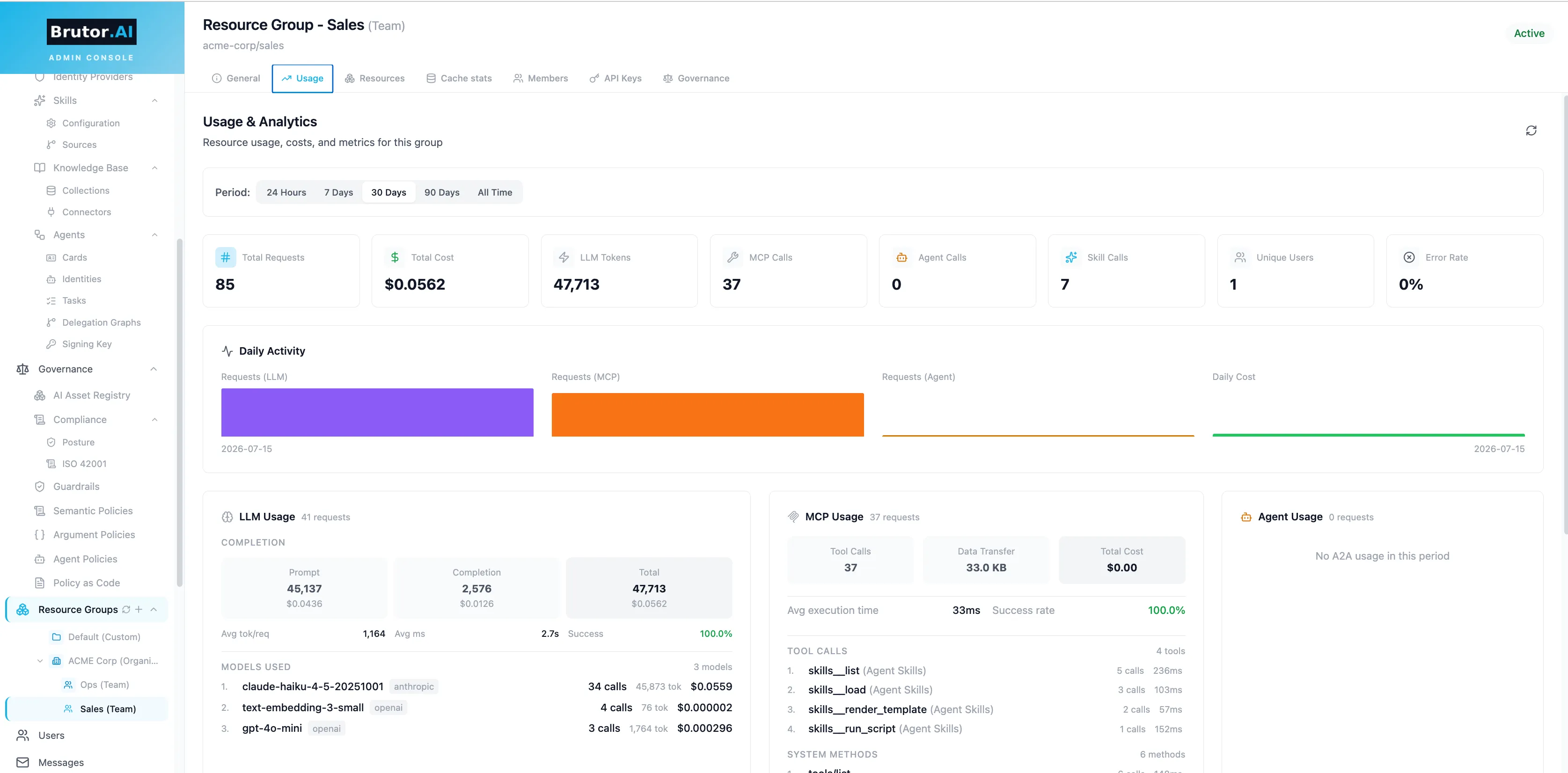
Resource Groups → Default → Usage shows requests, tokens and cost for the group. Your portal chat and your CLI call are both counted here, along with the models they used.
-
Mission Control → Overview shows the same traffic across the whole tenant.
What just happened
Section titled “What just happened”Both calls, the portal chat and the curl request, went through the same pipeline in the Core Proxy:
- Identify the caller. The portal session or API key identifies the tenant, the user or key, and the resource group. Access to
gpt-5.2is checked against the group’s model bindings. - Check the input. Guardrails bound to the group scan the prompt before it leaves for the provider.
- Apply limits. The group’s token, cost and rate limits are checked before the call is forwarded.
- Check the output. Output guardrails scan the answer before it reaches the caller.
- Meter and record. Tokens and cost are written to the usage ledger, and a proxy-log row is written under the correlation ID.
This is why every call has to go through the gateway. Brutor can only assure what it can see, and it sees every call that is pointed at it.