

Access through resource groups
A caller may use a skill if, and only if, the skill is assigned to a resource group the caller belongs to, directly or through inheritance. Skills have no access list of their own. Do not look for one and do not try to emulate one: group membership is the single answer to “who can run what”, the same as for models, MCP servers and agents, so an AI System’s limits, policies and audit apply to its skills too.
The same check runs at every layer: a skill outside the caller’s groups is missing from
skills__list and the initialize catalog, and skills__load, skills__read_resource,
skills__render_template and skills__run_script on it are all refused.
Assign a skill to a group
Section titled “Assign a skill to a group”In the Admin UI either side works:
- the skill: AI Estate → Resources → Skills → Configuration → skill → Access Control, then Save Changes
- the group: AI Estate → Resource Groups → group → Resources → Skills → Add Skills
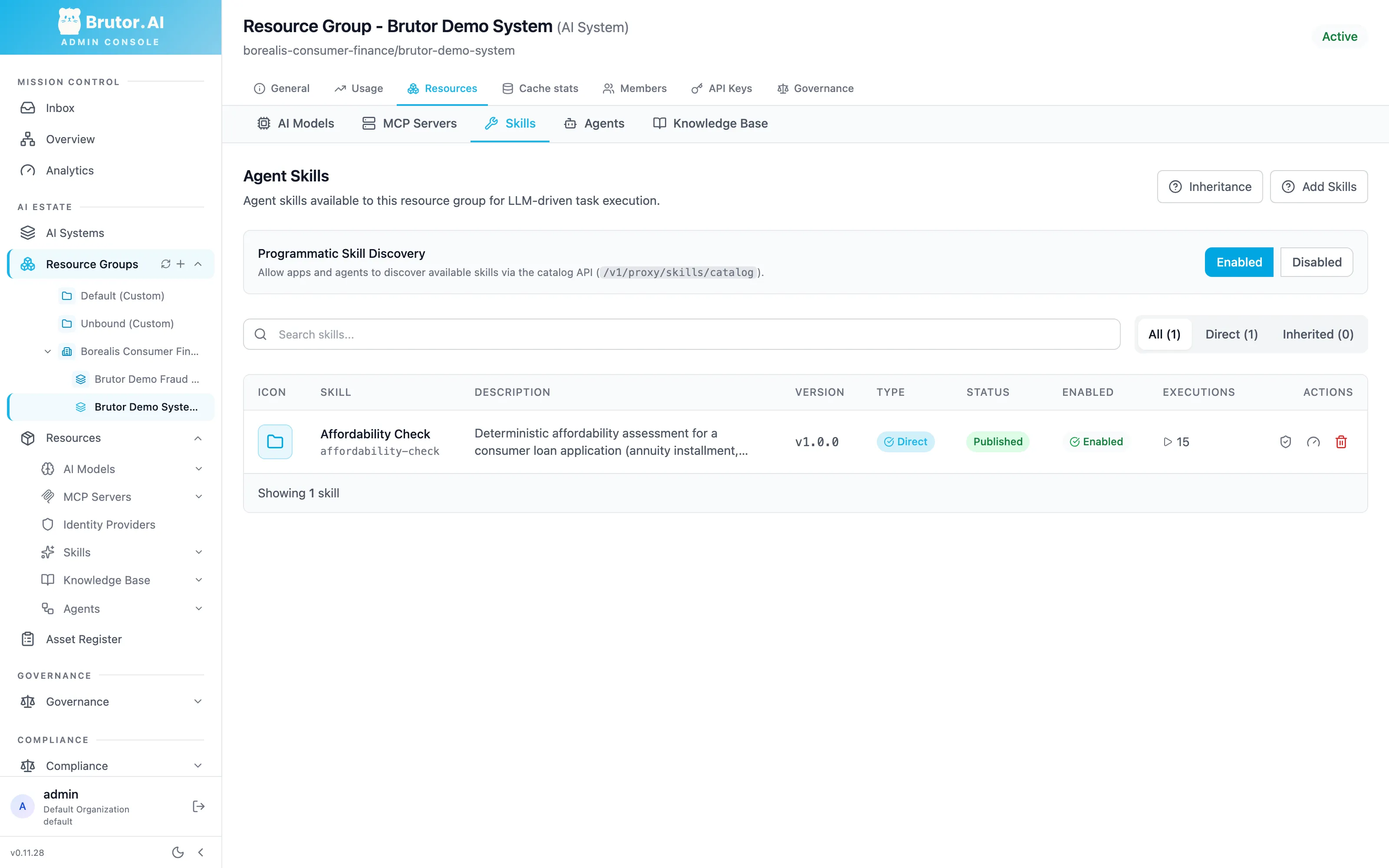
Through the API, POST /groups adds groups and DELETE /groups removes them; other
assignments are kept:
curl -s -X POST http://localhost:5050/v1/admin/agent-skills/$SKILL_ID/groups \ -H "Authorization: Bearer $ADMIN_TOKEN" -H "Content-Type: application/json" \ -d '{"group_ids": ["group-01M61N376V2RR6J2TV7Q7EVRET"]}'r = cp.post(f"/v1/admin/agent-skills/{skill_id}/groups", json={"group_ids": ["group-01M61N376V2RR6J2TV7Q7EVRET"]})r.raise_for_status()print(r.json()["skill"]["group_ids"])const r = await fetch(`http://localhost:5050/v1/admin/agent-skills/${skillId}/groups`, { method: "POST", headers: { Authorization: `Bearer ${ADMIN_TOKEN}`, "Content-Type": "application/json" }, body: JSON.stringify({ group_ids: ["group-01M61N376V2RR6J2TV7Q7EVRET"] }),});console.log((await r.json()).skill.group_ids);{ "skill": { "id": "skill-01M61N3A7RB6CWZ8CM8PCEP4SN", "name": "affordability-check", "status": "published", "group_ids": ["group-01M61N376V2RR6J2TV7Q7EVRET"], "groups": [ {"id": "group-01M61N376V2RR6J2TV7Q7EVRET", "name": "brutor-demo-system", "display_name": "Brutor Demo System", "group_type": "ai_system", "is_active": true, "parent_group_id": "group-01M61N36QYK1HVPN41KAE35PHP"} ] }, "auto_bound_server_group_ids": null}# Remove the skill from a groupcurl -s -X DELETE http://localhost:5050/v1/admin/agent-skills/$SKILL_ID/groups \ -H "Authorization: Bearer $ADMIN_TOKEN" -H "Content-Type: application/json" \ -d '{"group_ids": ["group-01M61N376V2RR6J2TV7Q7EVRET"]}'The PATCH /v1/admin/agent-skills/{id} body also takes group_ids, which replaces the
whole assignment list. The value "default" in any of these lists means the tenant’s
Default group. A group that does not exist in the tenant is refused.
Assignment is a runtime change: the skill appears in the group’s discovery on the next request, with no redeploy.
The skills MCP server must be bound too
Section titled “The skills MCP server must be bound too”Access is checked twice. The MCP route first checks that the caller’s group may use the
skills MCP server at all (resource_group_server_configs), and only then that the
skill is assigned to that group. The assign call takes care of the first half: when it
assigns a skill to a group that does not have the tenant’s skills server bound, it binds
system-agent-skill-server-config-{tenant} to that group in the same transaction. Create
(POST /v1/admin/agent-skills) and update (PATCH, with group_ids) list the groups that
got the binding in auto_bound_server_group_ids and in the admin audit log, so “who added
this server to this group” has an answer. POST /groups binds it the same way but returns
auto_bound_server_group_ids: null.
If you remove that server binding by hand later, every skill call from the group fails with
403 Access denied: you do not have access to this MCP server before any skill check runs.
To bind it explicitly:
curl -s -X POST http://localhost:5050/v1/admin/resource-groups/$GROUP_ID/server-configs \ -H "Authorization: Bearer $ADMIN_TOKEN" -H "Content-Type: application/json" \ -d '{"server_config_id": "system-agent-skill-server-config-default"}'Inheritance
Section titled “Inheritance”A skill assigned to a parent group is available in a child group when the child has
inherit_from_parent on, the same additive rule as for every other resource. The child’s
own limits and policies on skills can only be tighter than the parent’s
(skill limits and execution modes).
To see what a group can reach and why:
curl -s http://localhost:5050/v1/admin/resource-groups/$GROUP_ID/effective-agent-skills \ -H "Authorization: Bearer $ADMIN_TOKEN"{ "group_id": "group-01M61N376V2RR6J2TV7Q7EVRET", "group_name": "brutor-demo-system", "direct_skills": [ {"id": "skill-01M61N3A7RB6CWZ8CM8PCEP4SN", "name": "affordability-check", "version": "1.0.0", "status": "published", "enabled": true, "execution_count": 10, "is_inherited": false, "has_limits": false, "has_governance": false} ], "direct_count": 1, "inherited_skills": [], "inherited_count": 0, "effective_skills": [ {"id": "skill-01M61N3A7RB6CWZ8CM8PCEP4SN", "name": "affordability-check", "is_inherited": false} ], "effective_count": 1}Which groups a caller is scoped to
Section titled “Which groups a caller is scoped to”Discovery and access are computed from the caller’s groups, resolved like this:
| Caller | Scoped to | Example |
|---|---|---|
| Group-scoped API key | The key’s one group, whatever else its user belongs to | The Demo System’s key sees only affordability-check |
| Gateway or portal user | Every group the user is a member of, directly or through an end-user group | A user in two AI Systems sees the skills of both |
| Portal user with an active workspace | Only that workspace, if the user really is a member of it. The portal sends it as X-Resource-Group |
Switching workspace in the portal changes the Skills page |
| User in no group | Nothing. Discovery returns “No skills are currently available to you.” |
An X-Resource-Group header naming a group the user is not a member of is ignored, so it
can only narrow access, never widen it.