

Register and call MCP servers
The screening agent reads and writes through two MCP servers that ship with the demo:
| Server | Container | Tools the agent uses |
|---|---|---|
brutor-demo-applications (loan origination, mock) |
brutor-demo-applications-mcp:3014 |
applications_list_pending, applications_get, applications_set_recommendation, applications_add_note, applications_hand_off |
brutor-demo-credit-bureau (KYC and credit reference, mock) |
brutor-demo-credit-bureau-mcp:3015 |
bureau_verify_identity, bureau_get_report |
You do not write these servers here. You make them reachable for the agent, through the gateway, and nothing else: the agent never sees their URLs.
Register the servers
Section titled “Register the servers”Four Admin API calls per server, all from setup.py step 6. Start the server containers
first: the gateway connects to the server when it discovers tools.
-
Register the server.
base_urlis how the gateway reaches it (a container name onbrutor-network), not how your laptop does.Terminal window curl -X POST http://localhost:5050/v1/admin/mcp-servers \-H "Authorization: Bearer $ADMIN_TOKEN" -H "Content-Type: application/json" \-d '{"name": "brutor-demo-applications","description": "Loan origination system (mock): pending applications, records, notes, recommendations.","base_url": "http://brutor-demo-applications-mcp:3014","mcp_endpoint_path": "/mcp","auth_type": "none","enabled": true}'{"server": {"id": "mcp-01M61N37VYTSY0ETNQWW0DMRFY","name": "brutor-demo-applications","base_url": "http://brutor-demo-applications-mcp:3014","mcp_endpoint_path": "/mcp","auth_type": "none","enabled": true}}The
idis what the agent calls:APPLICATIONS_MCP_SERVER_ID. -
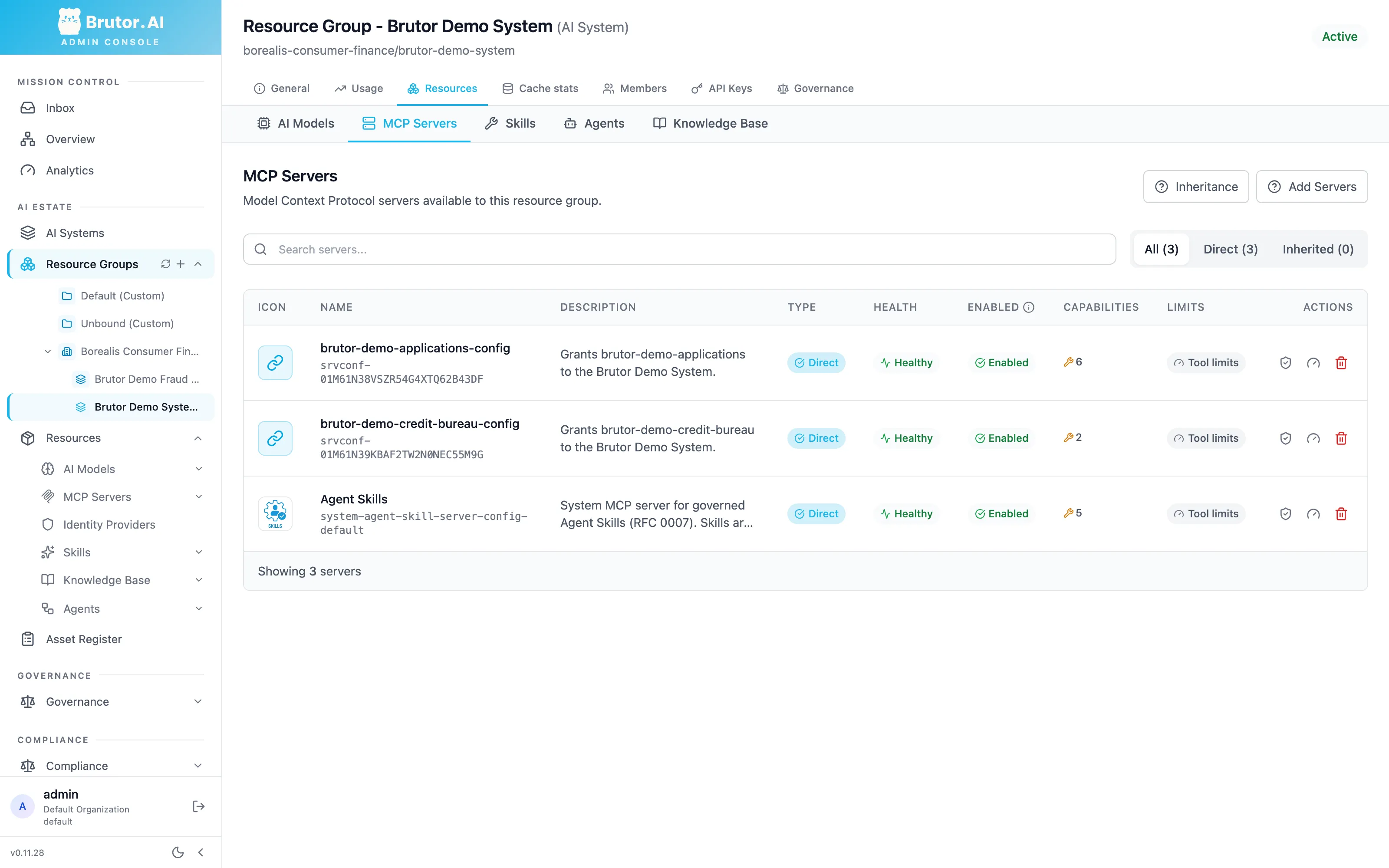
Create a server config and bind it to the AI System. A server config is the grantable unit: it is what a resource group is given access to.
Terminal window S=mcp-01M61N37VYTSY0ETNQWW0DMRFYG=group-01M61N376V2RR6J2TV7Q7EVRETcurl -X POST http://localhost:5050/v1/admin/server-configs \-H "Authorization: Bearer $ADMIN_TOKEN" -H "Content-Type: application/json" \-d '{"mcp_server_id": "'$S'", "name": "brutor-demo-applications-config","is_default": true, "enabled": true, "group_ids": ["'$G'"]}'curl -X POST http://localhost:5050/v1/admin/resource-groups/$G/server-configs \-H "Authorization: Bearer $ADMIN_TOKEN" -H "Content-Type: application/json" \-d '{"server_config_id": "srvconf-01M61N38VSZR54G4XTQ62B43DF"}'A repeat binding answers
409; provisioning treats that as “already there”. -
Discover the tools. The gateway connects to the server, runs
tools/list, and stores each tool’s schema, annotations and definition hash:Terminal window curl -X POST http://localhost:5050/v1/admin/mcp-servers/$S/discover-capabilities \-H "Authorization: Bearer $ADMIN_TOKEN" -H "Content-Type: application/json" -d '{}'The server detail (
GET /v1/admin/mcp-servers/{id}) then lists six tools:applications_list_pending,applications_get,applications_set_recommendation,applications_hand_off,applications_add_noteandapplications_stats. -
Set the capability filter. Which tools of the server this AI System sees, and how each is reached.
accessisenabled,approval_requiredordisabled; the PUT replaces the whole set:Terminal window curl -X PUT http://localhost:5050/v1/admin/resource-groups/$G/server-configs/srvconf-01M61N38VSZR54G4XTQ62B43DF/capabilities \-H "Authorization: Bearer $ADMIN_TOKEN" -H "Content-Type: application/json" \-d '{"capabilities": [{"capability_type": "tool", "capability_name": "applications_list_pending", "access": "enabled"},{"capability_type": "tool", "capability_name": "applications_get", "access": "enabled"},{"capability_type": "tool", "capability_name": "applications_set_recommendation", "access": "enabled"},{"capability_type": "tool", "capability_name": "applications_hand_off", "access": "enabled"},{"capability_type": "tool", "capability_name": "applications_add_note", "access": "enabled"},{"capability_type": "tool", "capability_name": "applications_stats", "access": "enabled"}]}'{"group_id": "group-01M61N376V2RR6J2TV7Q7EVRET","server_config_id": "srvconf-01M61N38VSZR54G4XTQ62B43DF","capabilities": [{"capability_type": "tool", "capability_name": "applications_list_pending","access": "enabled", "approval_timeout_seconds": null, "inherited_access": null}]}
The bureau server is registered the same way. Admin UI: AI Estate → Resources → MCP Servers → Configuration (register, discover), then Resource Groups → Brutor Demo System → Resources → MCP Servers (bind, capability filter).
Grant the tools to the agent identity
Section titled “Grant the tools to the agent identity”The capability filter says what the AI System may reach. The agent identity is
default-deny on top of that, so each tool it calls needs an mcp_tool grant:
A=agent-01M61N3B1GHVSCARE5CJZ5KEZ3for tool in applications_list_pending applications_get applications_add_note \ applications_set_recommendation applications_hand_off \ bureau_verify_identity bureau_get_report; do curl -s -X POST http://localhost:5050/v1/admin/agent-identities/$A/grants \ -H "Authorization: Bearer $ADMIN_TOKEN" -H "Content-Type: application/json" \ -d '{"action_type": "mcp_tool", "target": "'$tool'", "effect": "allow"}'doneapplications_stats is enabled on the AI System but not granted, so the agent cannot call
it: two layers, and both must allow. That is the least-privilege shape the
contract later records, and an unused grant shows up as a
least-privilege finding once there is enough traffic to judge.
Call a tool
Section titled “Call a tool”The gateway speaks MCP Streamable HTTP at /v1/proxy/mcp/{server_id}. The screening agent
calls it as plain JSON-RPC over httpx, one tools/call per node, and sends no
initialize:
def mcp_call(self, server_id, tool, arguments, *, step_id=None, step_name=None, turn=None, node=None, run_end=None, outcome_id=None, approval_token=None): hdr = self.headers(step_id, step_name, turn=turn, run_end=run_end, outcome_id=outcome_id, approval_token=approval_token) hdr["Content-Type"] = "application/json" hdr["Accept"] = "application/json, text/event-stream" self._rpc_id += 1 body = { "jsonrpc": "2.0", "id": self._rpc_id, "method": "tools/call", "params": { "name": tool, "arguments": arguments, # MCP per-request client identity: the agent's release "_meta": {"io.modelcontextprotocol/clientInfo": self.release.client_info()}, }, } response = self.http.post(f"{self.base}/v1/proxy/mcp/{server_id}", json=body, headers=hdr) payload = self._parse_body(response) # JSON, or the last SSE data: frame self._raise_for_status(response, payload) # 202 / 403 / 4xx / 5xx → typed errors ...On the wire, one node’s call looks like this:
POST /v1/proxy/mcp/mcp-01M61N37VYTSY0ETNQWW0DMRFY HTTP/1.1Host: core:8100Authorization: Bearer sk_brutor_api_Xq3...X-Tenant-ID: defaultX-Brutor-Agent-Name: brutor-demo-screening-agentX-Brutor-Agent-Version: 0.2.0x-brutor-run-id: bds-APP-20261028-004-01M61Q2W7ZK3DN6E8R4T5V9XB2X-Brutor-Step-Id: gatherX-Brutor-Step-Name: Gather the application factsX-Brutor-Turn-Id: t1X-Brutor-Turn-Seq: 1traceparent: 00-4bf92f3577b34da6a3ce929d0e0e4736-00f067aa0ba902b7-01Content-Type: application/jsonAccept: application/json, text/event-stream
{"jsonrpc": "2.0", "id": 1, "method": "tools/call", "params": {"name": "applications_get", "arguments": {"application_id": "APP-20261028-004"}, "_meta": {"io.modelcontextprotocol/clientInfo": {"name": "brutor-demo-screening-agent", "version": "0.2.0"}}}}{"jsonrpc": "2.0", "id": 1, "result": {"content": [{"type": "text", "text": "{\"application_id\": \"APP-20261028-004\", \"status\": \"received\", \"applicant\": {\"applicant_id\": \"CUST-1001\", \"full_name\": \"Maja Lindholm\", ...}, \"requested_amount_eur\": 12000, \"term_months\": 48, ...}"}], "isError": false}}The client reads result.content[0].text, parses it as JSON when it can, and raises
ToolError on a JSON-RPC error or result.isError.
Why stateless, and why not the MCP SDK
Section titled “Why stateless, and why not the MCP SDK”The MCP Python SDK is the right choice for an agent that discovers tools and hands them to a model (see Use MCP tools through the gateway). The screening agent is different: its graph calls known tools in a fixed order, so there is nothing to discover. Skipping the session buys three things:
- No extra governed action. An
initializehandshake per run would be one more action in every run’s ledger, inflating the action count drift detection baselines. - The
202is visible. An approval hold returns HTTP 202 with a plain JSON body, not a JSON-RPC envelope; an SDK session surfaces that as a transport error. Raw JSON-RPC lets the client read the body and raiseApprovalRequired. - The release still reaches the gateway. Without
initializethere is no sessionclientInfo, so the client sends it per request inparams._meta, the MCP 2026-07-28 carrier.
The demo servers are stateless FastMCP servers, which is what makes this possible. A
stateful server needs the initialize handshake and its Mcp-Session-Id.
What the gateway does on every tool call
Section titled “What the gateway does on every tool call”None of this is in the agent:
| Check | Where it is configured | What the agent sees on a refusal |
|---|---|---|
| The AI System may reach the server and tool | Binding + capability filter (above) | 403 |
| The identity is granted the tool | mcp_tool grant (above) |
403 |
Input guardrails on the arguments (mcp_input) |
Guardrails | 403 guardrail_blocked |
| Argument policies on the arguments | Human oversight | 202 approval_required, or a deny |
| Limits (MCP calls per hour, concurrency) | Limits | 429 with Retry-After |
Output guardrails on the result (mcp_output) |
Guardrails | 403 guardrail_blocked |
| The audit row, with the tool definition hash and server version in force | always | |
| A sealed action record for sensitive reads | sensitive_data: true on the AI System |
The third step, credit_report, is a sensitive read: because the AI System declares
sensitive_data, the gateway seals a signed action record
for every bureau report the agent pulls.
Next: the skill, which is called through MCP as well.