

Skills in the User Portal
End users do not run skills by hand. In the User Portal a skill is something the assistant uses on their behalf, inside the same governance as an agent’s call: the user’s resource groups decide which skills are there, and every step is on the audit trail under the user’s name.
The Skills page
Section titled “The Skills page”Skills in the portal’s navigation lists the skills of the active workspace: name, version, description, category and tags, an Approval required chip when the skill’s metadata asks for approval, and the cost estimate if one is set. Switching workspace refetches the list. A workspace with none shows “There are no Agent Skills assigned to your workspace yet.”
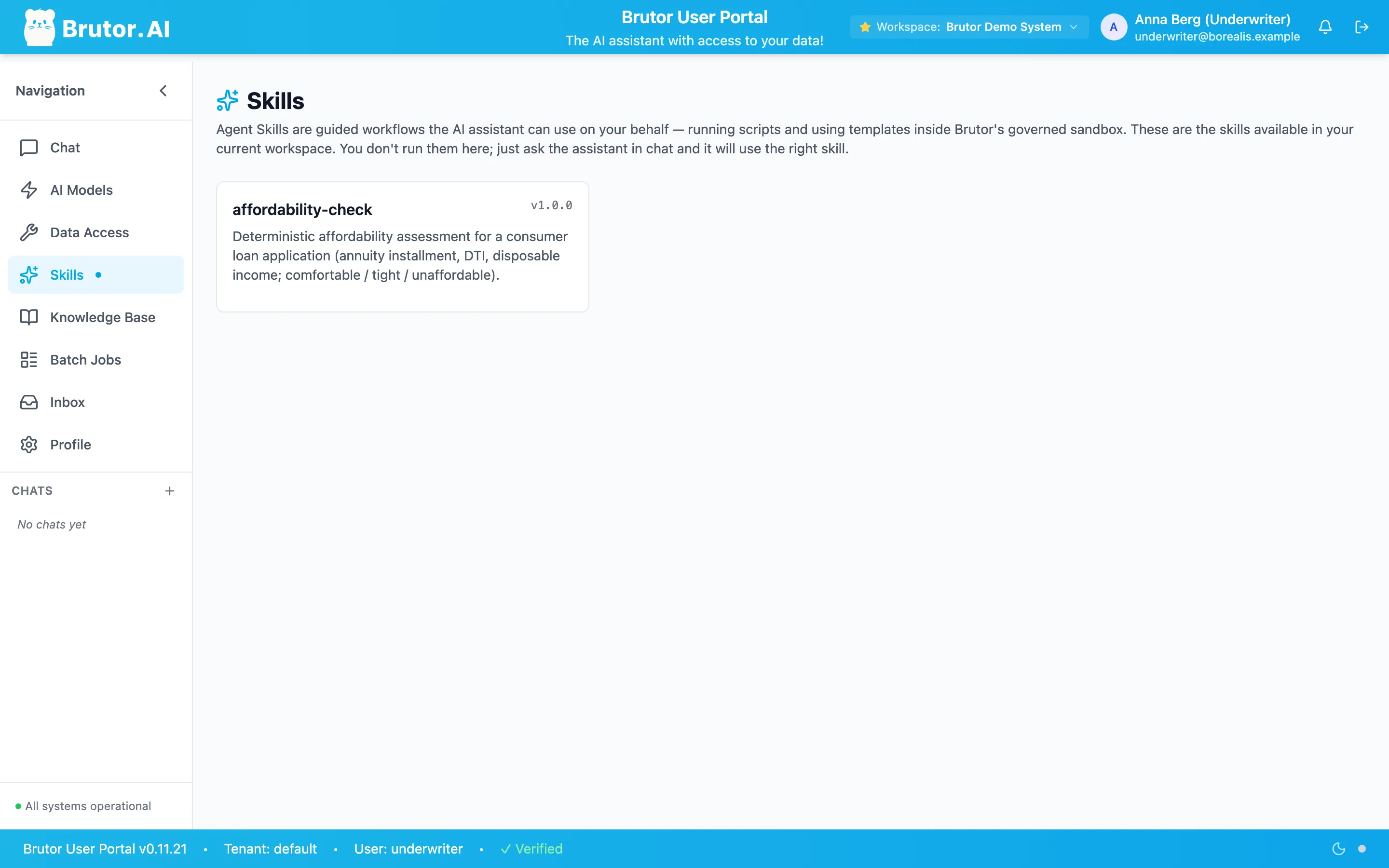
The page reads the access-scoped catalog from the Core Proxy, with the portal JWT and the
active workspace in X-Resource-Group:
curl -s http://localhost:8100/v1/proxy/skills/catalog \ -H "Authorization: Bearer $PORTAL_JWT" -H "X-Tenant-ID: default" \ -H "X-Resource-Group: group-01M61N376V2RR6J2TV7Q7EVRET"{ "skills": [ { "id": "skill-01M61N3A7RB6CWZ8CM8PCEP4SN", "name": "affordability-check", "description": "Deterministic affordability assessment for a consumer loan application (annuity installment, DTI, disposable income; comfortable / tight / unaffordable).", "version": "1.0.0", "status": "PUBLISHED", "license": null, "tags": [], "category": null, "icon_name": null, "cost_estimate_usd": null, "approval_required": false, "compatibility": null, "execution_count": 10 } ], "total": 1, "group_id": "group-01M61N376V2RR6J2TV7Q7EVRET", "group_name": "brutor-demo-system"}Query parameters category and tag filter the list; format=llm returns it as compact
plain text (- affordability-check: Deterministic ...) for pasting into a prompt. When the
group’s skill governance sets discovery_enabled: false, this endpoint answers
403 Skill discovery turned off for group "...".
Skills in chat
Section titled “Skills in chat”The portal connects the workspace’s MCP servers to the chat, and the skills MCP server is
one of them. The assistant sees the five skills__* tools and the catalog, loads the skill
that fits the request and runs it, exactly as an agent does over MCP.
The portal sends the active workspace with every MCP request, so the assistant only finds
the skills of that workspace.
Two things to know:
- The chat model must support function calling. With a model that does not, the portal warns that connected MCP tools and Agent Skills will not be invoked.
- Approvals reach the user in the portal’s Inbox. A skill run held by an approval appears there for the members of the group who may decide it (approvals).
Local export
Section titled “Local export”Progressive disclosure keeps a skill’s code on the server, which is the right default. Some teams also want a governed way to hand a curated skill to a developer’s local coding agent: a pull-request review or changelog skill that runs in Claude Code, not in the portal. Local export is that exception, and it is narrow:
- Off by default, per skill. Only a skill with
allow_local_export: truecan be exported; everything else stays MCP-only. - Group-scoped. A user can export only skills assigned to one of their resource groups (or the groups above them).
- Published and enabled only.
- Audited. Every export writes a proxy-log row (
proxy_type: skill,mcp_method: skill_local_export) naming the user and the skill.
An admin enables it on the skill. The flag is operational, so it can be changed on a published skill; the Admin UI has no switch for it, so use the API:
curl -s -X PATCH http://localhost:5050/v1/admin/agent-skills/$SKILL_ID \ -H "Authorization: Bearer $ADMIN_TOKEN" -H "Content-Type: application/json" \ -d '{"allow_local_export": true}'{ "skill": { "id": "skill-01M61N3A7RB6CWZ8CM8PCEP4SN", "name": "affordability-check", "status": "published", "allow_local_export": true }, "auto_bound_server_group_ids": null}A group member then lists and downloads, with a portal JWT:
curl -s http://localhost:8100/v1/portal/skills \  -H "Authorization: Bearer $PORTAL_JWT" -H "X-Tenant-ID: default"
curl -s http://localhost:8100/v1/portal/skills/skill-01M61N3A7RB6CWZ8CM8PCEP4SN/export \  -H "Authorization: Bearer $PORTAL_JWT" -H "X-Tenant-ID: default" \  -o affordability-check-1.0.0.zipunzip affordability-check-1.0.0.zip -d ~/.claude/skills/affordability-check
import io, zipfile, pathlib, httpx
core = httpx.Client(base_url="http://localhost:8100", headers={"Authorization": f"Bearer {PORTAL_JWT}", "X-Tenant-ID": "default"})skills = core.get("/v1/portal/skills").json()["skills"]sid = next(s["id"] for s in skills if s["name"] == "affordability-check")
r = core.get(f"/v1/portal/skills/{sid}/export")r.raise_for_status()zipfile.ZipFile(io.BytesIO(r.content)).extractall( pathlib.Path.home() / ".claude/skills/affordability-check")import { writeFile } from "node:fs/promises";
const h = { Authorization: `Bearer ${process.env.PORTAL_JWT}`, "X-Tenant-ID": "default" };const { skills } = await (await fetch("http://localhost:8100/v1/portal/skills", { headers: h })).json();const sid = skills.find((s) => s.name === "affordability-check").id;
const r = await fetch(`http://localhost:8100/v1/portal/skills/${sid}/export`, { headers: h });if (!r.ok) throw new Error((await r.json()).error);await writeFile("affordability-check-1.0.0.zip", Buffer.from(await r.arrayBuffer()));GET /v1/portal/skills returns only the exportable skills:
{ "skills": [ {"id": "skill-01M61N3A7RB6CWZ8CM8PCEP4SN", "name": "affordability-check", "description": "Deterministic affordability assessment for a consumer loan application (...)", "version": "1.0.0", "execution_count": 10} ], "total": 1}The export is a ZIP named <name>-<version>.zip with SKILL.md at its root, plus
scripts/, references/ and assets/, the layout coding agents that honour the Agent
Skills spec expect. A skill that is not exportable, not reachable from the user’s groups,
or does not exist gets the same answer, so names cannot be probed:
{"error": "Skill not found, not accessible to your groups, or not exportable"}with 403.