

Conversations, notice and feedback
A chat turn is rarely one HTTP call. A question that makes the model call two tools is at least three LLM calls and two MCP calls. The gateway records each call, but only your client knows which calls belong to the same turn and the same conversation. Tell it, with three ids, and the Admin UI shows one run per user message, cost per conversation, and a notice record in front of every conversation’s first answer.
| Id | Header | Minted by | Lifetime | Example |
|---|---|---|---|---|
| Turn | X-Brutor-Run-Id |
Your client, per user message | Until the turn’s last tool call settles | 3f2b8c1e-6d4a-4b9e-9c1f-2a7d5e8b0c34 |
| Conversation | X-Brutor-Session-Id |
Your client, per chat | The life of the chat | chat-01JZ8Q2N4K |
| Conversation handle | X-Brutor-Conversation-Handle |
Your client, fresh ULID per chat | The life of the chat, persisted with it | 01JZ8Q2N4KX6M3B7C9D1E5F0GH |
One run per turn
Section titled “One run per turn”-
Mint a turn id when the user presses send, before any request for that message goes out. The shipped portal uses
crypto.randomUUID(). Any opaque string of 1 to 128 characters works. -
Send it as
X-Brutor-Run-Idon every request the turn makes: each LLM call in the tool loop and each MCPtools/call. Read it at request time from one shared place (the portal keeps it insrc/lib/runContext.ts), because your MCP clients were created long before the message was typed. -
Read the run the gateway derived from the
x-brutor-run-idresponse header and keep it with the rendered answer. The gateway never stores the id you sent: it derives the run root from it, keyed by the tenant secret and bound to the user’s credential. -
Clear the turn id when the turn settles, so a later unrelated call is not counted into it.
Without a turn id, each HTTP call becomes its own run: one question that called two tools lands as five unrelated runs, the per-run cost and step counts are wrong, and the run’s Tools count reads 0. A portal chat needs no explicit end marker: the gateway closes an idle run 120 seconds after its last call. Details: Run lifecycle.
The conversation
Section titled “The conversation”Send the chat’s id as X-Brutor-Session-Id on the LLM calls (1 to 200 characters; the
shipped portal uses its chat id). A chat can run for months; this is the scope a person’s
spend accumulates in, and a conversation budget is evaluated against it. When the user
deletes the chat, send X-Brutor-Session-End: true on the final request so the session is
closed.
The AI-interaction notice
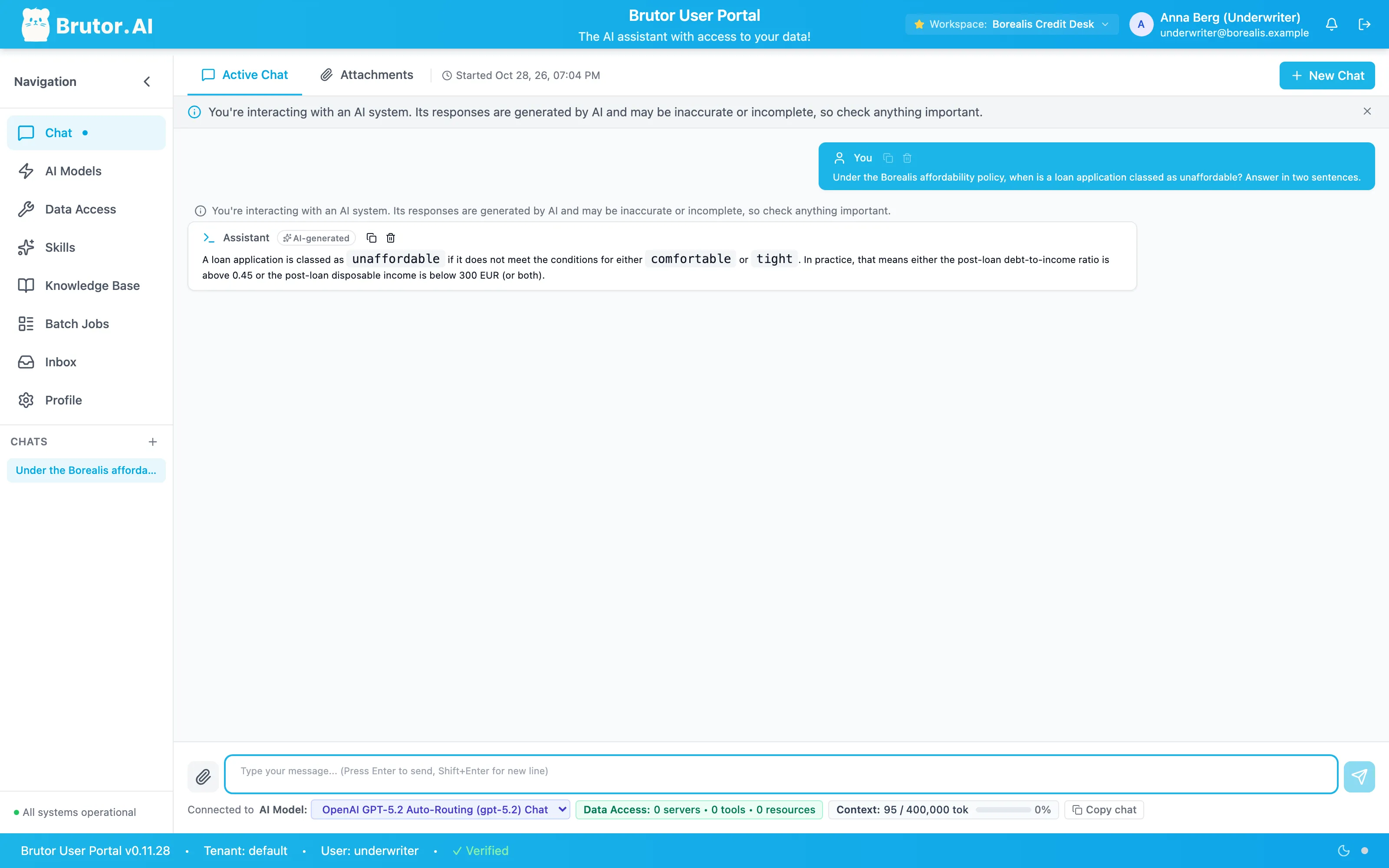
Section titled “The AI-interaction notice”The shipped portal tells people they are dealing with an AI before the first substantive answer, and the gateway seals that it did, so an auditor can check that the notice preceded the answer (Transparency). A custom client that should produce the same evidence does four things:
-
Mint a conversation handle: a fresh ULID per conversation, never derived from the user, the session or the chat id. Persist it with the chat so a reload keeps it.
-
Fetch the notice configuration for the workspace (the AI System):
Terminal window curl -s "http://localhost:8100/v1/portal/evidence/notice-config?ai_system_id=group-01M61N376V2RR6J2TV7Q7EVRET" \-H "X-Tenant-ID: default" \-H "Authorization: Bearer $JWT"{"enabled": true,"surface": "both","text": {"en": "You are chatting with an AI assistant operated by Borealis Consumer Finance."},"text_sha256": {"en": "5b0e7c4f..."}}surfaceisbanner,inlineorboth.textis present only when an admin set one; otherwise render your own default in the user’s language. If the call fails, render the default anyway: the notice never silently disappears. The only way to render none isenabled: falsewith anexemptionan admin declared. -
Render the notice, then record it, once per surface you showed.
text_sha256is the lowercase hex SHA-256 of the UTF-8 bytes of the exact text the user saw, computed by your client, not copied from the config:Terminal window TEXT="You are chatting with an AI assistant operated by Borealis Consumer Finance."SHA=$(printf '%s' "$TEXT" | shasum -a 256 | cut -d' ' -f1)curl -s http://localhost:8100/v1/portal/evidence/notice \-H "Content-Type: application/json" \-H "X-Tenant-ID: default" \-H "Authorization: Bearer $JWT" \-d "{\"conversation_handle\": \"01JZ8Q2N4KX6M3B7C9D1E5F0GH\", \"locale\": \"en\", \"method\": \"banner\", \"text_sha256\": \"$SHA\", \"ai_system_id\": \"group-01M61N376V2RR6J2TV7Q7EVRET\"}"import hashlibtext = "You are chatting with an AI assistant operated by Borealis Consumer Finance."rec = portal.call("POST", "/v1/portal/evidence/notice", json={"conversation_handle": handle,"locale": "en","method": "banner","text_sha256": hashlib.sha256(text.encode("utf-8")).hexdigest(),"ai_system_id": portal.group,})const text = "You are chatting with an AI assistant operated by Borealis Consumer Finance.";const digest = await crypto.subtle.digest("SHA-256", new TextEncoder().encode(text));const textSha256 = [...new Uint8Array(digest)].map((b) => b.toString(16).padStart(2, "0")).join("");const rec = await api("/v1/portal/evidence/notice", {method: "POST",body: { conversation_handle: handle, locale: "en", method: "banner", text_sha256: textSha256, ai_system_id: session.group },});{"record_id": "ai.brutor.notice/01JZ8Q2P0V7B3N5M1K9J4H6G2F"} -
Hold the first chat request until the notice has rendered, and send the handle as
X-Brutor-Conversation-Handleon every chat request of the conversation. The shipped portal gates each send on the notice (waitForNoticeGateinsrc/lib/noticeGate.ts) and gives up after 10 seconds rather than hang; the evidence then honestly reports that conversation’s notice as late.
| Notice error | Status | Body |
|---|---|---|
Handle not a ULID, bad locale, method not banner/inline, digest not 64 lowercase hex, unknown AI System |
422 |
{"error": "invalid_notice", "detail": "..."} |
| More than 30 renders per user per minute | 429 |
{"error": "rate_limited", "detail": "..."}, Retry-After: 60 |
| No evidence signing key on this deployment | 503 |
{"error": "evidence_disabled", "detail": "..."} |
The notice record carries no user identity: its only link to the conversation is the
handle. Successful completions also come back with X-Brutor-AI-Generated: true; label
those answers in your UI and in anything users copy or export.
Keeping history
Section titled “Keeping history”The gateway stores no conversations for your client. Each chat request carries the
whole messages array, and there is no Portal API to list or reload chats. Your client owns
history. The shipped portal keeps it in the browser’s IndexedDB (database
brutor-portal-storage, store chat-sessions), one row per chat:
{ "id": "chat-01JZ8Q2N4K", "userId": "2", "groupId": "group-01M61N376V2RR6J2TV7Q7EVRET", "title": "Affordability rules", "createdAt": 1793205010000, "updatedAt": 1793205122000, "messages": [{"role": "user", "content": "Summarise our affordability rules..."}, {"role": "assistant", "content": "- Disposable income ..."}], "attachments": [], "messageCount": 2, "conversationHandle": "01JZ8Q2N4KX6M3B7C9D1E5F0GH"}Copy the parts that matter:
- Key history by user, so two people on one device never see each other’s chats.
- Stamp each chat with its workspace and never move it; switching workspace starts a new chat in the new workspace.
- Persist the conversation handle with the chat.
- Clear the user’s history on sign-out if the device is shared.
What the gateway does keep is the audit trail: every call, with its run, session, cost and governance decisions, visible to admins in the Admin UI under the AI System’s runs and the request logs. That is evidence, not a chat store, and end users cannot read it back.
Thumbs feedback
Section titled “Thumbs feedback”A thumbs rating is the only signal in the run ledger that says whether an answer was any good. Send it against the returned run id:
curl -s http://localhost:8100/v1/portal/runs/06GSDAPWJY4T107B1PKHEY4HT1/feedback \ -H "Content-Type: application/json" \ -H "X-Tenant-ID: default" \ -H "Authorization: Bearer $JWT" \ -d '{"score": -1, "comment": "Cited the 2025 policy, not the current one."}'portal.call("POST", f"/v1/portal/runs/{run_id}/feedback", json={"score": -1, "comment": "Cited the 2025 policy, not the current one."})await api(`/v1/portal/runs/${encodeURIComponent(runId)}/feedback`, { method: "POST", body: { score: -1, comment: "Cited the 2025 policy, not the current one." },});{"run_id": "06GSDAPWJY4T107B1PKHEY4HT1", "score": -1}| Field | Example | Rule |
|---|---|---|
score |
1 |
1 up, -1 down, 0 withdraws a previous rating (answers "score": null). Anything else: 422 |
comment |
Cited the 2025 policy... |
Optional, at most 2000 characters (422 beyond) |
Only a user who made calls in that run can rate it; any other run answers 404
“Run not found”, so the endpoint cannot be used to probe other people’s traffic. You can
rate immediately: the rating is stored at once and rolled up when the run closes.
Related
Section titled “Related”- Agent headers: grammar of the run headers
- Run lifecycle: how runs start and close
- Transparency: the notice, its record and exemptions
- Streaming chat: where these headers are sent