

Configure an OAuth-backed MCP server
Four records make an MCP server OAuth-backed. You write them with the Admin UI or the
Control Plane admin API (:5050); the Core Proxy reads them at request time.
Identity Provider ←── idp_id ── MCP server (auth_type: "oauth") ↑ ↑ idp_id mcp_server_id │ │OAuth App Client ←── oauth_client_id ── MCP Server Access Configuration ──→ resource groupsBefore you start, register an OAuth app at the provider (a GitHub OAuth App, a HubSpot app,
a Slack app, an Okta or Keycloak client). Note its client ID, client secret and the scopes,
and register the redirect URI of every client that will run the flow: the User Portal’s is
{portal origin}/callback, for example http://localhost:3001/callback.
-
Identity Provider
Section titled “Identity Provider”AI Estate → Resources → Identity Providers → Add Identity Provider. Choose protocol OIDC / OAuth 2.0 and a type:
Type Use when Example OIDC (Auto-Discovery) ( oidc_discoverable)The provider publishes /.well-known/openid-configuration; fill Well-Known Discovery URLKeycloak, Okta, Entra ID, Google OIDC (Manual Configuration) ( oidc)OIDC without a usable discovery document An internal OIDC server OAuth 2.0 ( oauth2)Plain OAuth 2.0, endpoints entered by hand GitHub, HubSpot, Slack On the Endpoints tab, the fields the OAuth proxy uses are:
Field Used for Example Issuer URL Identity of the authorization server; stored tokens are bound to it https://mcp.hubspot.comAuthorization Endpoint Where /authorizesends the user; without it discovery advertises noauthorization_endpointhttps://mcp.hubspot.com/oauth/authorizeToken Endpoint Code exchange and refresh https://mcp.hubspot.com/oauth/v1/tokenUserInfo Endpoint The stable user subject. A {token}placeholder is replaced by the access token instead of sending a bearer headerhttps://api.hubapi.com/oauth/v1/access-tokens/{token}Revocation Endpoint Admin revocation also revokes at the provider (RFC 7009) https://oauth2.googleapis.com/revokeJWKS URI Passed through in the discovery document https://keycloak.example.com/realms/mcp/protocol/openid-connect/certsOn OAuth Settings: Supports PKCE, Supports Refresh Tokens, Globally Supported Scopes (advertised as
scopes_supported), token endpoint auth methods, response and grant types. Use the row’s Test Connection action, and Discover Endpoints in the details view to refresh endpoints from the discovery URL.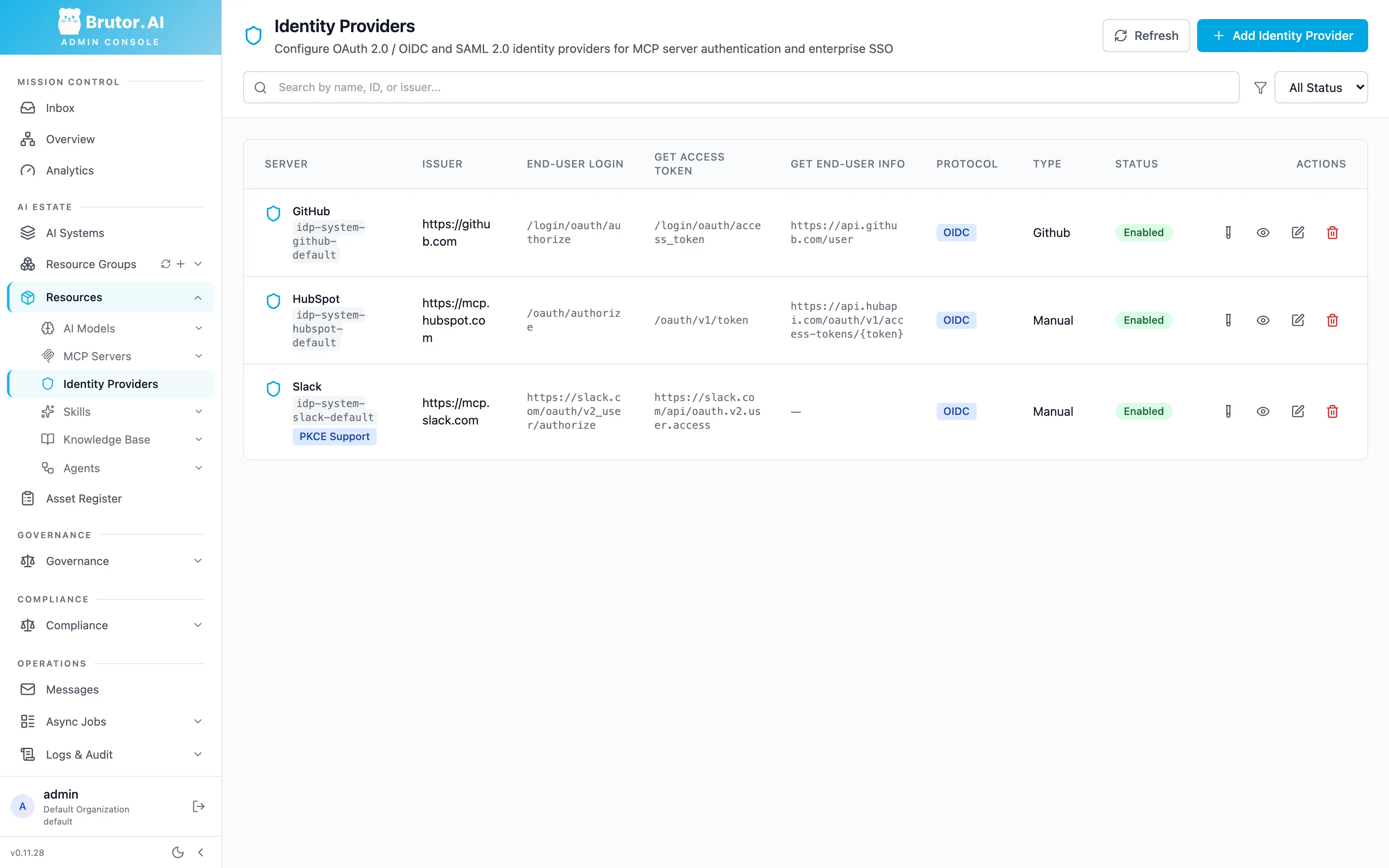
-
MCP server with auth type
Section titled “MCP server with auth type oauth”oauthMCP Servers → Configuration → MCP Servers. On the server form, Test Connection and do OIDC discovery probes the URL. When the server challenges with
WWW-Authenticateor publishes OAuth metadata, the form switches Authentication Type tooauth(badge Auto-detected) and offers Import Identity Provider with the discovered endpoints. An imported IdP that lacks required endpoints is created disabled until you complete it on the Identity Providers page.With
oauthselected, the Linked Identity Provider panel shows the IdP the server uses (idp_id). -
OAuth App Client
Section titled “OAuth App Client”MCP Servers → Configuration → MCP Server Access → OAuth App Clients → Create OAuth App Client. Fill Client Name, Application Type, Identity Provider (Auth Server), Client Type, Client ID, Client Secret, Redirect URI, Scopes, and Enable PKCE (Recommended for security).
The client type decides what the gateway sends at code exchange:
Client Type PKCE Secret at /tokenProvider example Confidential (client secret, no PKCE) ( confidential)no Stored secret, added by the gateway GitHub OAuth App Public (PKCE, no client secret) ( public)yes none Keycloak public client Public with Secret (PKCE + client secret) ( public_with_secret)yes Stored secret, added by the gateway HubSpot The secret is encrypted at rest and never returned by the API. Clients never need to send it: the gateway looks it up by (MCP server, IdP,
client_id).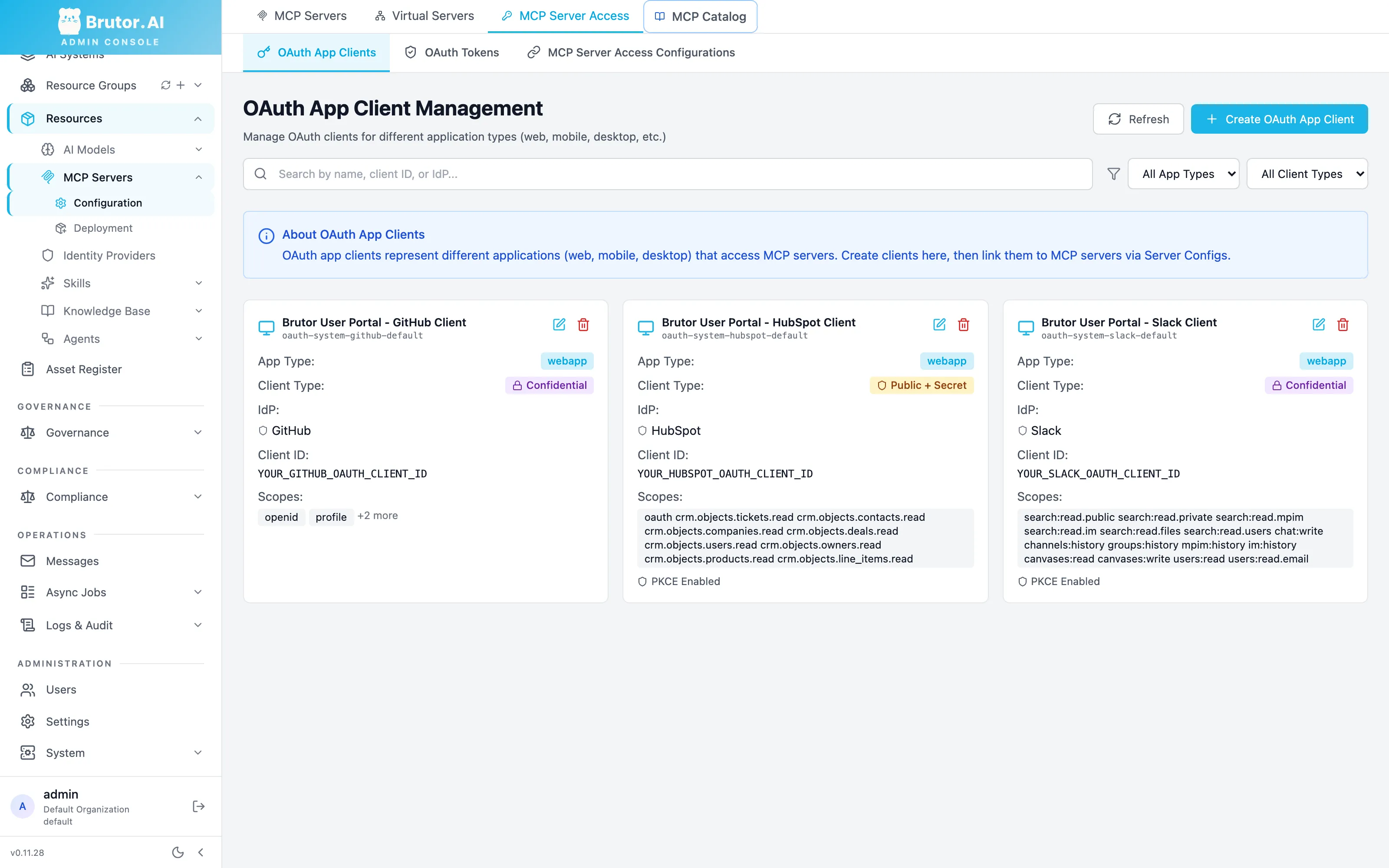
-
MCP Server Access Configuration
Section titled “MCP Server Access Configuration”MCP Server Access → MCP Server Access Configurations → Create Server Config. Choose Backend type MCP Server (real upstream), pick the MCP Server, then the OAuth Client (the list is filtered to clients of the server’s IdP). Set Configuration Name, Display Name (for Users), Access Control (Resource Groups) and Enabled.
This record is what makes the server show up in the User Portal with Connect & Authorize, and what the token endpoint uses to find the client secret.
The same setup through the admin API
Section titled “The same setup through the admin API”Log in to the Control Plane and use the returned access_token:
TOKEN=$(curl -s -X POST http://localhost:5050/v1/admin-users/tenant/login \ -H "Content-Type: application/json" \ -d '{"username": "admin", "password": "Admin123!", "tenant_id": "default"}' \ | jq -r .access_token)Create the Identity Provider
Section titled “Create the Identity Provider”curl -s -X POST http://localhost:5050/v1/admin/idps \ -H "Authorization: Bearer $TOKEN" -H "X-Tenant-ID: default" \ -H "Content-Type: application/json" \ -d '{ "name": "HubSpot", "issuer": "https://mcp.hubspot.com", "type": "manual", "protocol": "oidc", "authorization_endpoint": "https://mcp.hubspot.com/oauth/authorize", "token_endpoint": "https://mcp.hubspot.com/oauth/v1/token", "userinfo_endpoint": "https://api.hubapi.com/oauth/v1/access-tokens/{token}", "supports_pkce": true, "supports_refresh_tokens": true, "scopes_supported": ["oauth", "crm.objects.contacts.read"], "enabled": true }'201 Created. The response wraps the stored record:
{ "idp": { "id": "idp-01M62B3K9QZ7X4T8V2N5R6W1HC", "name": "HubSpot", "issuer": "https://mcp.hubspot.com", "type": "manual", "protocol": "oidc", "authorization_endpoint": "https://mcp.hubspot.com/oauth/authorize", "token_endpoint": "https://mcp.hubspot.com/oauth/v1/token", "userinfo_endpoint": "https://api.hubapi.com/oauth/v1/access-tokens/{token}", "registration_endpoint": null, "supports_pkce": true, "supports_refresh_tokens": true, "scopes_supported": ["oauth", "crm.objects.contacts.read"], "enabled": true }, "is_reachable": null, "last_test_at": null, "accessed_by": {"user_id": "tenant-admin-70748b7520ed", "username": "admin", "user_email": "admin@example.com", "user_role_id": "role-8a3afe57526e", "user_role": "Tenant Admin"}}A second IdP with the same issuer in the tenant is refused with 400.
Link the MCP server
Section titled “Link the MCP server”curl -s -X PATCH http://localhost:5050/v1/admin/mcp-servers/mcp-01M62B4R7D3H8KQ2W5Y9T1N6PV \ -H "Authorization: Bearer $TOKEN" -H "X-Tenant-ID: default" \ -H "Content-Type: application/json" \ -d '{"auth_type": "oauth", "idp_id": "idp-01M62B3K9QZ7X4T8V2N5R6W1HC"}'auth_type is one of none, bearer or oauth.
Create the OAuth App Client
Section titled “Create the OAuth App Client”curl -s -X POST http://localhost:5050/v1/admin/oauth-app-clients \ -H "Authorization: Bearer $TOKEN" -H "X-Tenant-ID: default" \ -H "Content-Type: application/json" \ -d '{ "name": "HubSpot - portal", "app_type": "webapp", "idp_id": "idp-01M62B3K9QZ7X4T8V2N5R6W1HC", "client_id": "03012b66-5c17-4d7c-9297-39d9eb6c7c7f", "client_secret": "a1b2c3d4-...", "redirect_uri": "http://localhost:3001/callback", "scopes": ["oauth", "crm.objects.contacts.read"], "client_type": "public_with_secret", "supports_pkce": true, "allowed_grant_types": ["authorization_code", "refresh_token"] }'app_type is one of webapp, mobile, desktop, cli, service. 201 Created; the
secret is not echoed:
{ "id": "oauthapp-01M62B6F2J8C4N7R1X9Q3T5VWD", "name": "HubSpot - portal", "app_type": "webapp", "idp_id": "idp-01M62B3K9QZ7X4T8V2N5R6W1HC", "client_id": "03012b66-5c17-4d7c-9297-39d9eb6c7c7f", "redirect_uri": "http://localhost:3001/callback", "scopes": ["oauth", "crm.objects.contacts.read"], "client_type": "public_with_secret", "supports_pkce": true, "allowed_grant_types": ["authorization_code", "refresh_token"], "description": null, "registered_at": "2026-10-28T16:40:12.511204+00:00", "registered_by": null, "last_used": null, "is_active": true, "auto_registered": false, "registration_client_uri": null, "created_at": "2026-10-28T16:40:12.511204+00:00", "updated_at": "2026-10-28T16:40:12.511204+00:00"}If the IdP has a registration_endpoint, let the gateway register the client at the
provider for you (RFC 7591) instead of creating it by hand:
curl -s -X POST http://localhost:5050/v1/admin/oauth-app-clients/auto-register \ -H "Authorization: Bearer $TOKEN" -H "X-Tenant-ID: default" \ -H "Content-Type: application/json" \ -d '{ "idp_id": "idp-01M62C1A5S9K3E7W2Q8Z4R6TYB", "client_name": "Brutor portal", "app_type": "webapp", "redirect_uri": "http://localhost:3001/callback", "scopes": ["openid", "profile", "email"] }'The response has the same shape, with auto_registered: true and the provider’s
registration_client_uri. client_type is confidential when the provider returned a
secret, public when it did not. An IdP without a registration endpoint returns 400.
This call is available in the API only; the Admin UI has no button for it.
Create the access configuration
Section titled “Create the access configuration”curl -s -X POST http://localhost:5050/v1/admin/server-configs \ -H "Authorization: Bearer $TOKEN" -H "X-Tenant-ID: default" \ -H "Content-Type: application/json" \ -d '{ "mcp_server_id": "mcp-01M62B4R7D3H8KQ2W5Y9T1N6PV", "oauth_client_id": "oauthapp-01M62B6F2J8C4N7R1X9Q3T5VWD", "group_ids": ["group-01M61N210719PF4238FN59NEEG"], "name": "HubSpot CRM", "display_name": "HubSpot CRM", "enabled": true }'The response (abridged) carries the linked server and client:
{ "id": "srvconf-01M62B8N4T6Y2K9D3F7H1Q5WXZ", "mcp_server_id": "mcp-01M62B4R7D3H8KQ2W5Y9T1N6PV", "server_kind": "mcp", "oauth_client_id": "oauthapp-01M62B6F2J8C4N7R1X9Q3T5VWD", "group_ids": ["group-01M61N210719PF4238FN59NEEG"], "name": "HubSpot CRM", "enabled": true, "mcp_server": {"id": "mcp-01M62B4R7D3H8KQ2W5Y9T1N6PV", "auth_type": "oauth", "base_url": "https://mcp.hubspot.com"}, "oauth_client": {"id": "oauthapp-01M62B6F2J8C4N7R1X9Q3T5VWD", "client_type": "public_with_secret", "flow": "authorization_code_pkce", "idp_id": "idp-01M62B3K9QZ7X4T8V2N5R6W1HC", "is_active": true}}Check the result
Section titled “Check the result”The facade’s discovery documents are public. With the seeded HubSpot records:
curl -s http://localhost:8100/v1/proxy/oauth/mcp-system-hubspot-default/idp-system-hubspot-default/.well-known/openid-configuration{ "issuer": "http://localhost:8100/v1/proxy/oauth/mcp-system-hubspot-default/idp-system-hubspot-default", "authorization_endpoint": "http://localhost:8100/v1/proxy/oauth/mcp-system-hubspot-default/idp-system-hubspot-default/authorize", "token_endpoint": "http://localhost:8100/v1/proxy/oauth/mcp-system-hubspot-default/idp-system-hubspot-default/token", "userinfo_endpoint": "https://api.hubapi.com/oauth/v1/access-tokens/{token}", "authorization_response_iss_parameter_supported": false, "client_id_metadata_document_supported": false, "code_challenge_methods_supported": ["S256"], "grant_types_supported": ["authorization_code", "refresh_token"], "response_types_supported": ["code"], "scopes_supported": ["oauth", "crm.objects.tickets.read", "crm.objects.contacts.read", "crm.objects.companies.read"], "token_endpoint_auth_methods_supported": ["client_secret_post", "none"]}A disabled MCP server or IdP answers 404 (MCP server not found or disabled,
Identity Provider not found or disabled). Next:
authorize from your own agent or
connect in the User Portal.