

OAuth in the User Portal
The User Portal drives the whole OAuth flow for its users. An MCP server needs OAuth in the portal when its access configuration has an OAuth App Client and the user is in one of the configuration’s resource groups.
What the user does
Section titled “What the user does”-
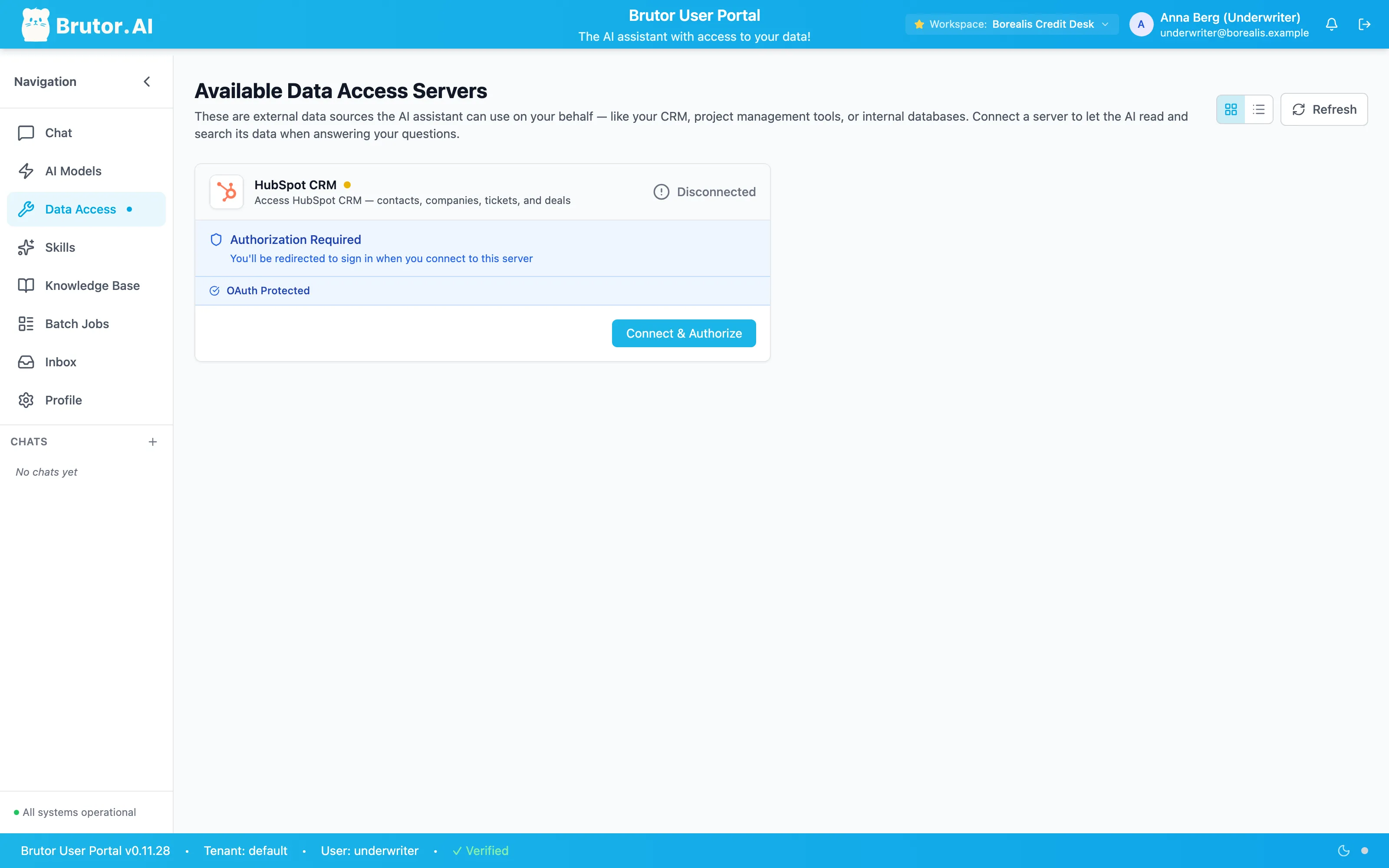
Open Data Access in the portal navigation. OAuth-backed servers are marked OAuth Protected, with the hint You’ll be redirected to sign in when you connect to this server.
-
Click Connect & Authorize. A sign-in popup opens at the provider (HubSpot, GitHub, Slack). The user signs in and grants the scopes of the OAuth App Client.
-
The popup returns to the portal’s
/callbackpage, which hands the code back to the portal window and closes. The card shows Connected, the provider identity as Logged in as: with a Logout button, and the server’s tools. -
From then on the user’s chats can call the server’s tools as that user.
When the stored upstream token can no longer be used (expired with no refresh token,
refresh rejected, revoked by an admin), the next tool call returns
401 oauth_reauth_required. The card
then shows Your access to HubSpot CRM expired with a Re-authorize button, which reruns
the popup without ending the portal session.
What the portal sends
Section titled “What the portal sends”The portal reads its server list from the Core Proxy, GET /v1/portal/servers. For an
OAuth-backed configuration each entry carries an oauth_client block with the facade’s
token endpoint:
{ "id": "sc-system-hubspot-default", "server_kind": "mcp", "mcp_server_id": "mcp-system-hubspot-default", "oauth_required": true, "is_open_server": false, "mcp_server": { "id": "mcp-system-hubspot-default", "base_url": "http://localhost:8100/v1/proxy/mcp/mcp-system-hubspot-default", "auth_type": "oauth" }, "oauth_client": { "id": "oauth-system-hubspot-default", "client_id": "03012b66-5c17-4d7c-9297-39d9eb6c7c7f", "client_type": "public_with_secret", "flow": "authorization_code_pkce", "redirect_uri": "http://localhost:3001/callback", "idp_id": "idp-system-hubspot-default", "idp": { "id": "idp-system-hubspot-default", "authorization_endpoint": "https://mcp.hubspot.com/oauth/authorize", "token_endpoint": "https://mcp.hubspot.com/oauth/v1/token", "supports_pkce": false }, "token_endpoint": "http://localhost:8100/v1/proxy/oauth/mcp-system-hubspot-default/idp-system-hubspot-default/token", "openid_config_endpoint": "http://localhost:8100/v1/proxy/oauth/mcp-system-hubspot-default/idp-system-hubspot-default/.well-known/openid-configuration" }, "user_oauth_status": {"has_valid_token": false, "needs_authorization": true, "token_expires_at": null}}(Abridged.) flow is authorization_code for a confidential client and
authorization_code_pkce otherwise.
| Step | Portal behaviour |
|---|---|
| Authorize | Opens a popup at oauth_client.idp.authorization_endpoint (the provider, directly) with redirect_uri = the portal’s own origin + /callback, a state and, for the PKCE flow, an S256 challenge |
| Token exchange | Posts the code to oauth_client.token_endpoint (the gateway facade) with X-Tenant-ID. It sends no client secret; the gateway adds it |
| MCP calls | Authorization: Bearer <MCP JWT> plus X-Gateway-Authorization: Bearer <portal session JWT> to mcp_server.base_url |
| Token storage | The MCP JWT lives in the tab’s sessionStorage, one entry per server, so a new tab or browser session authorizes again |
To embed the same flow in your own chat client, see Build a chat client and Authorize from your own agent.