

Workspaces and catalogs
A user can belong to several resource groups. The portal calls each one a workspace: it decides which models, MCP servers, knowledge bases and skills the user sees, and which limits, guardrails and approval rules apply to everything they send. Your client picks one active workspace after sign-in, scopes every catalog to it, and stamps it on every proxy call.
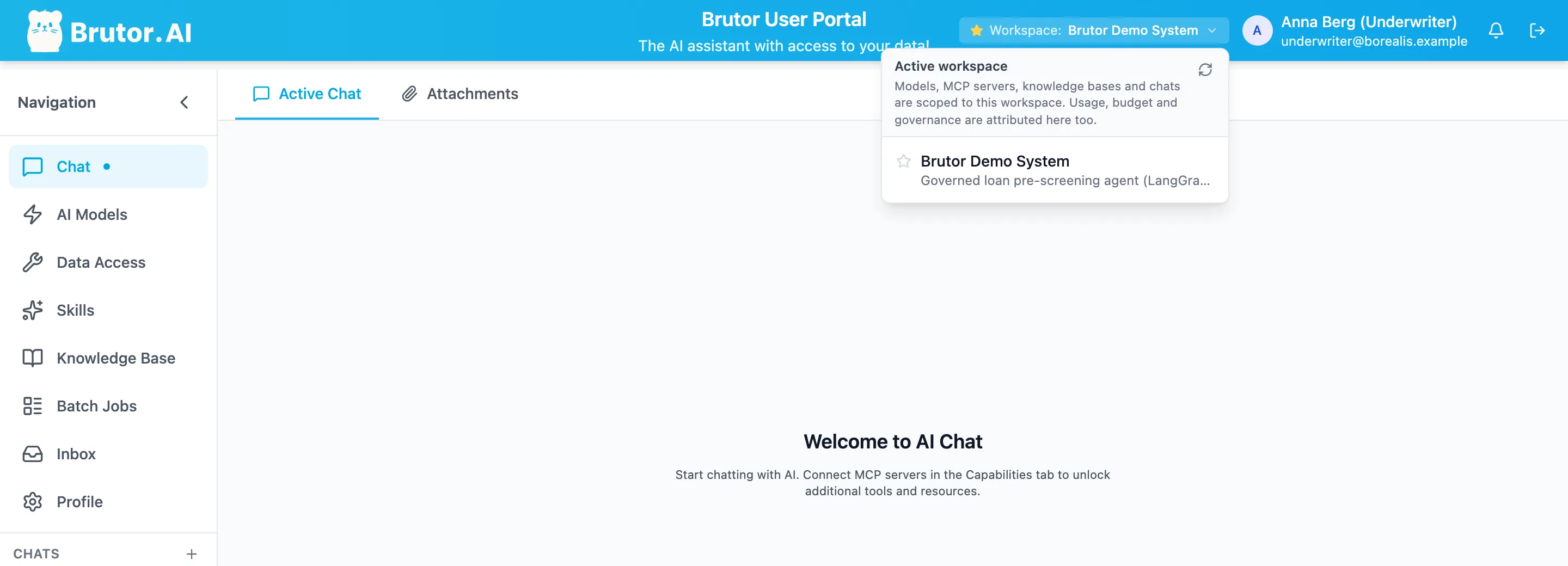
Pick the active workspace
Section titled “Pick the active workspace”-
List the user’s groups.
Terminal window curl -s http://localhost:8100/v1/portal/auth/groups \-H "X-Tenant-ID: default" \-H "Authorization: Bearer $JWT"groups = portal.call("GET", "/v1/portal/auth/groups")const groups = await api("/v1/portal/auth/groups");{"groups": [{"id": "group-01M61N376V2RR6J2TV7Q7EVRET","name": "brutor-demo-system","display_name": "Brutor Demo System","description": "Governed loan pre-screening agent (LangGraph). High-risk under Annex III 5(b).","is_primary": true}],"primary_group_id": "group-01M61N376V2RR6J2TV7Q7EVRET"}The list holds active groups the user is a member of, either directly or through an end-user group bound to the resource group (for example one provisioned by SAML or SCIM), sorted by
name. -
Resolve the active one the way the shipped portal does (
resolveActiveGroupinsrc/lib/activeGroup.ts):primary_group_idfrom the server, when set;- otherwise a group id you cached locally, if it is still in the list;
- otherwise the first group;
- no groups at all: show an empty state, the user can use nothing yet.
ids = [g["id"] for g in groups["groups"]]portal.group = groups["primary_group_id"] or (cached if cached in ids else None) or (ids[0] if ids else None) -
Let the user switch.
PATCH /v1/portal/auth/primary-groupstores the choice on the user, so it follows them to other devices and becomes the fallback scope for any request withoutX-Resource-Group:Terminal window curl -s -X PATCH http://localhost:8100/v1/portal/auth/primary-group \-H "Content-Type: application/json" \-H "X-Tenant-ID: default" \-H "Authorization: Bearer $JWT" \-d '{"group_id": "group-01M61N376V2RR6J2TV7Q7EVRET"}'res = portal.call("PATCH", "/v1/portal/auth/primary-group",json={"group_id": "group-01M61N376V2RR6J2TV7Q7EVRET"})portal.group = res["primary_group_id"]const res = await api("/v1/portal/auth/primary-group", {method: "PATCH",body: { group_id: "group-01M61N376V2RR6J2TV7Q7EVRET" },});session.group = res.primary_group_id;{"primary_group_id": "group-01M61N376V2RR6J2TV7Q7EVRET", "previous_primary_group_id": null}A group the user does not belong to answers
400“You are not a member of the target resource group”. Users cannot join groups themselves; an admin adds them.
After a switch, refetch every catalog below and start a new conversation. The shipped portal stamps each saved chat with the workspace it was created in and never moves it.
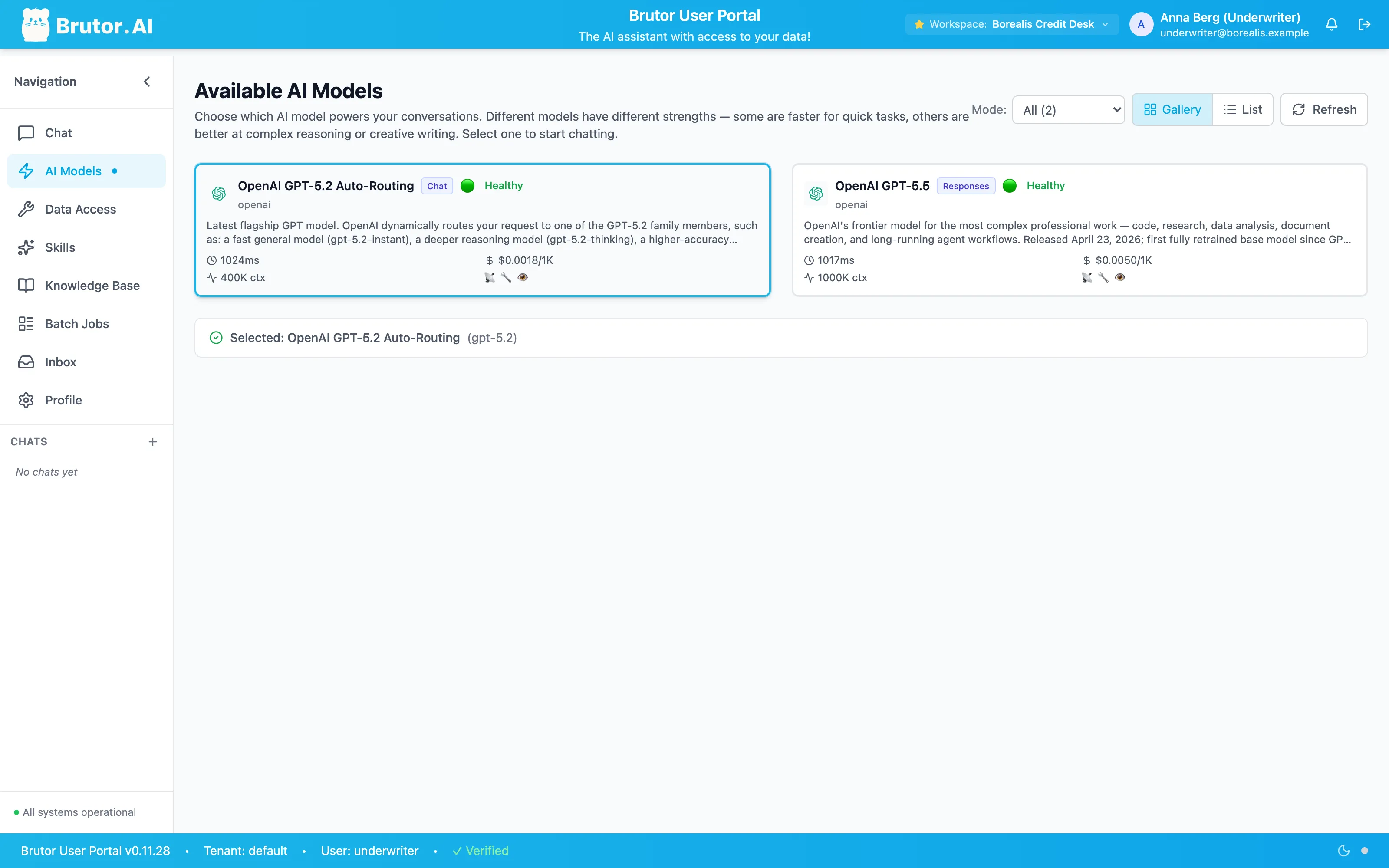
Models
Section titled “Models”curl -s "http://localhost:8100/v1/portal/models?group_id=$GROUP&modes=chat,responses" \ -H "X-Tenant-ID: default" \ -H "Authorization: Bearer $JWT"{ "models": [ { "id": "llm-01KQGWDF0CQ1587ZH8K3T9721P", "name": "GPT-5.4 mini (Demo)", "model_name": "gpt-5.4-mini", "provider": "openai", "provider_id": "prov-01KQGWD9N6Y2C1T4A8B3E5F7G0", "mode": "chat", "enabled": true, "health_status": { "status": "healthy", "last_check": "2026-10-28T16:20:03Z", "last_success": "2026-10-28T16:20:03Z", "consecutive_failures": 0, "avg_latency_ms": 812.4, "error_message": null }, "capabilities": { "supports_streaming": true, "supports_function_calling": true, "supports_vision": true, "supports_batch": true, "max_tokens": 16384, "context_window": 400000, "supports_reasoning": false, "requires_responses_api": false }, "cost_estimate": {"input_per_1k_tokens": 0.00075, "output_per_1k_tokens": 0.0045, "currency": "USD"}, "metadata": {"description": "Fast general-purpose model", "recommended_for": ["chat"]}, "groups": null, "created_at": "2026-10-28T16:21:40Z", "updated_at": "2026-10-28T16:21:40Z", "usage_count": 214, "supported_image_sizes": null, "supported_image_qualities": null, "max_images_per_request": null, "supported_voices": null, "supported_audio_formats": null, "supported_video_resolutions": null, "supported_video_durations": null, "max_video_duration_seconds": null } ], "default_model": "gpt-5.4-mini", "total_models": 1, "resource_groups": ["group-01M61N376V2RR6J2TV7Q7EVRET"]}| Query parameter | Example | Effect |
|---|---|---|
group_id |
group-01M61N376V2RR6J2TV7Q7EVRET |
Models granted to that group and its ancestors. Omit: the union of all the user’s groups |
modes |
chat,responses |
Comma-separated: chat, responses, completion, embedding, image_generation, audio_speech, audio_transcription, video_generation, rerank, moderation. Unknown tokens are dropped |
enabled_only |
true |
Default true |
healthy_only |
false |
Default false |
provider |
openai |
Provider slug |
What to read off each model:
id(llm-<ULID>) is the Brutor model id. Send it asmodel_idon chat calls, alongsidemodel(model_name): when two configured models share a provider name, the id is what keeps the call on the one this workspace was granted.capabilities.requires_responses_apitruemeans the model only answers on/v1/proxy/llm/responses; see Streaming chat.modetells the composer what it can do: chat, or a media mode (image, speech, transcription, video) with the matchingsupported_*lists for its option dropdowns.default_modelis themodel_nameof the first healthy model, a sensible preselect.
Without modes, the list holds every user-facing mode (chat, responses,
completion and the four media modes). Embedding, rerank and moderation models are
infrastructure and are left out; ask for them explicitly. A model only appears when the
workspace’s binding has portal visibility on, and a routing group appears as one model
under its own name. GET /v1/portal/models/{model_id} returns
{"model": {...}, "accessible": true, "access_reason": "..."} with groups filled in, or
403 “You do not have access to this AI model”.
MCP servers
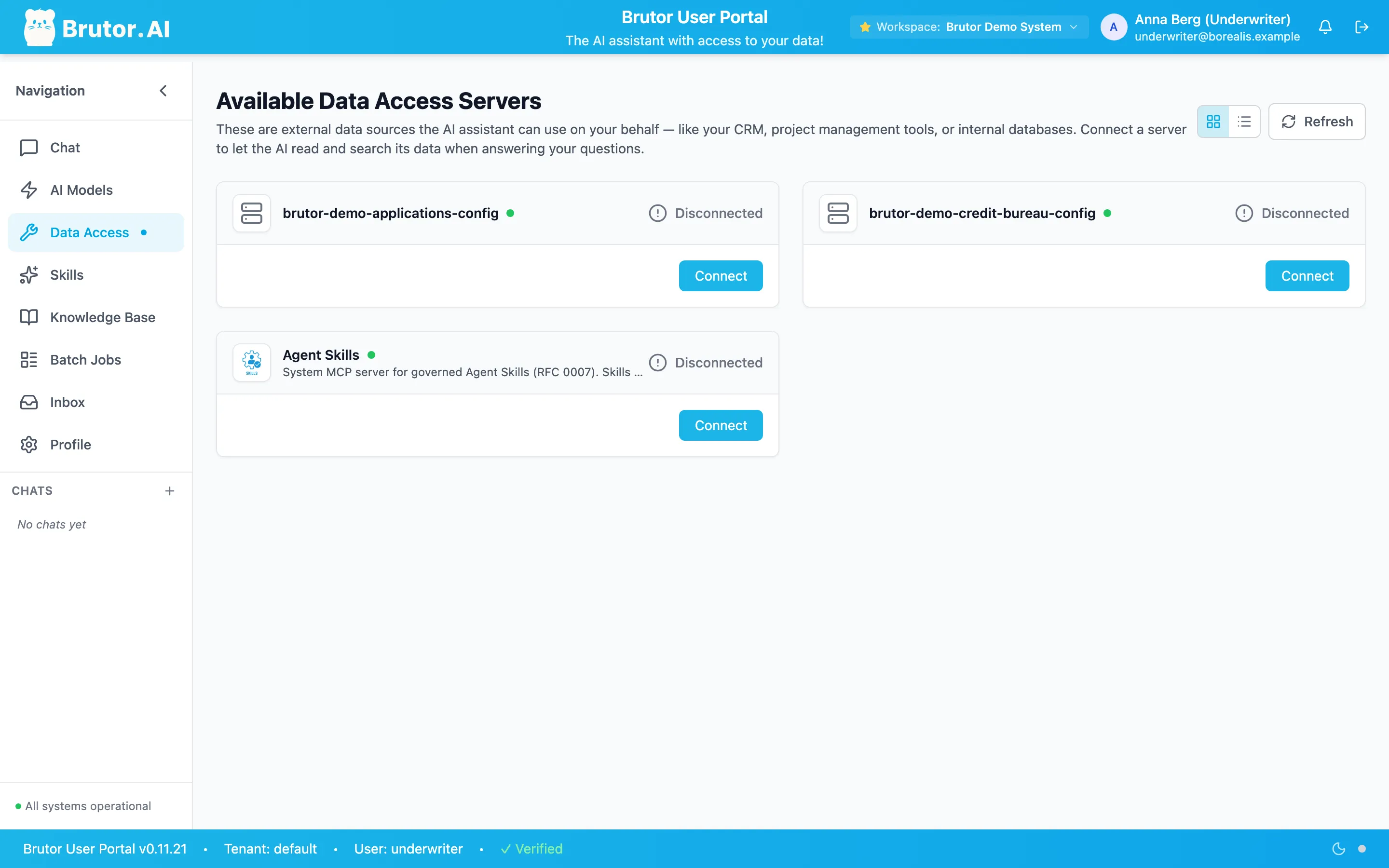
Section titled “MCP servers”curl -s "http://localhost:8100/v1/portal/servers?group_id=$GROUP&enabled_only=true" \ -H "X-Tenant-ID: default" \ -H "Authorization: Bearer $JWT"{ "servers": [ { "id": "srvconf-01M61N38VSZR54G4XTQ62B43DF", "name": "brutor-demo-applications-config", "description": "Grants brutor-demo-applications to the Brutor Demo System.", "display_name": null, "display_description": null, "server_kind": "mcp", "mcp_server_id": "mcp-01M61N37VYTSY0ETNQWW0DMRFY", "mcp_server_name": "brutor-demo-applications", "virtual_server_id": null, "virtual_server_name": null, "oauth_client_id": null, "oauth_required": false, "is_open_server": true, "enabled": true, "icon_url": null, "priority": 100, "is_default": true, "created_at": "2026-10-28T16:22:07.993525", "updated_at": "2026-10-28T16:22:07.284655", "mcp_server": { "id": "mcp-01M61N37VYTSY0ETNQWW0DMRFY", "name": "brutor-demo-applications", "base_url": "http://localhost:8100/v1/proxy/mcp/mcp-01M61N37VYTSY0ETNQWW0DMRFY", "mcp_endpoint_path": "", "auth_type": "none", "timeout": 30.0, "discovered_at": "2026-10-28T16:22:08.216786Z", "icon": {"url": "/v1/assets/mcp-servers/mcp-01M61N37VYTSY0ETNQWW0DMRFY/icon"}, "health": {"status": "healthy", "last_check": "2026-10-28T16:23:29.362908Z", "last_success": "2026-10-28T16:23:29.362908Z", "consecutive_failures": 0, "error": null}, "capabilities": { "tools": [ { "name": "applications_list_pending", "description": "List applications that have not been screened yet...", "inputSchema": {"type": "object", "properties": {"limit": {"type": "integer", "default": 10}}}, "annotations": {"readOnlyHint": true, "idempotentHint": true}, "access": "enabled" }, { "name": "applications_set_recommendation", "description": "Record the screening recommendation...", "inputSchema": {"type": "object", "properties": {"application_id": {"type": "string"}}}, "access": "approval_required", "approval_timeout_seconds": 86400 } ], "prompts": [], "resources": [], "resource_templates": [] } }, "virtual_server": null, "oauth_client": null, "user_oauth_status": {"has_valid_token": false, "needs_authorization": false, "token_expires_at": null} } ], "total": 1}What matters for a chat client:
- Where to send tool calls:
mcp_server.base_url(orvirtual_server.base_urlwhenserver_kindisvmcp). That is a/v1/proxy/mcp/{id}or/v1/proxy/vmcp/{id}route on the Core Proxy; see Tool calls. - Which tools exist for this user:
capabilities.toolsis already filtered by the workspace’s capability policy. Disabled tools are removed. Each remaining tool carriesaccess:enabled, orapproval_requiredwithapproval_timeout_seconds, so your UI can mark the tools that will wait for a human. - Whether the user must authorize first:
oauth_requiredtruemeans the server calls its upstream with the user’s own OAuth token;oauth_clientcarries the client id, scopes and the gateway’s proxiedtoken_endpoint. See OAuth-protected servers.
The list also holds the tenant’s system Agent Skills server (id
system-agent-skill-server-default), whose tools are the skills the workspace may run
(named skill__<slug>). GET /v1/portal/servers/{config_id} returns one entry;
GET /v1/portal/servers/by-group/{group_id}?include_inherited=true lists one group’s
servers with {"group_id", "servers", "total", "includes_inherited"}.
Knowledge bases
Section titled “Knowledge bases”curl -s "http://localhost:8100/v1/portal/knowledgebases?group_id=$GROUP&enabled_only=true" \ -H "X-Tenant-ID: default" \ -H "Authorization: Bearer $JWT"{ "collections": [ { "id": "kbc-01M61N3F7Q2W8E4R6T0Y1U3I5O", "name": "credit-policy", "description": "Borealis consumer credit policy and affordability guidelines", "enabled": true, "top_k": 5, "similarity_threshold": 0.7, "max_context_tokens": 4000, "document_count": 12, "ready_count": 12, "created_at": "2026-10-28T16:22:30Z", "updated_at": "2026-10-28T16:40:02Z" } ], "total": 1}This list is informational. There is no request field to pick a knowledge base and no
portal search endpoint: when a chat call arrives for a workspace with knowledge bases bound,
the gateway retrieves from them and injects the passages itself. Show the list so users
know what the assistant can draw on, and ready_count against document_count so they
know whether indexing has finished. GET /v1/portal/knowledgebases/{collection_id} returns
one collection, or 404 “Collection not found or access denied”. How retrieval works:
Knowledge bases.
For connector-synced knowledge bases, GET /v1/portal/kb-identities/connectors and
GET /v1/portal/kb-identities show which source identities (Confluence, Slack, GitHub…)
are linked to the user so source permissions apply. Linking is done by an admin;
POST /v1/portal/kb-identities answers 501.
Skills
Section titled “Skills”GET /v1/proxy/skills/catalog lists the skills the active workspace may run, scoped by the
X-Resource-Group header (this one is a proxy route):
curl -s http://localhost:8100/v1/proxy/skills/catalog \ -H "X-Tenant-ID: default" \ -H "Authorization: Bearer $JWT" \ -H "X-Gateway-Authorization: Bearer $JWT" \ -H "X-Resource-Group: $GROUP"{ "group_id": "group-01M61N376V2RR6J2TV7Q7EVRET", "group_name": "brutor-demo-system", "skills": [ { "id": "skill-01M61N3A7RB6CWZ8CM8PCEP4SN", "name": "affordability-check", "description": "Deterministic affordability assessment for a consumer loan application...", "version": "1.0.0", "status": "PUBLISHED", "approval_required": false, "execution_count": 5, "category": null, "tags": [], "icon_name": null, "license": null, "compatibility": null, "cost_estimate_usd": null } ], "total": 1}The catalog is for display. The model runs a skill through the Agent Skills MCP server like
any other tool; see Agent Skills. (GET /v1/portal/skills is a different
list: skills an admin allowed for local export as a ZIP.)
Related
Section titled “Related”- Resource groups: what a workspace grants and how inheritance works
- Streaming chat: use the model you just listed
- Portal API reference: models, servers, knowledge bases