
Knowledge bases in the User Portal
End users never pick a knowledge base. When they chat in the User Portal, the portal sends
the request to the Core Proxy’s chat completions endpoint with their portal JWT and the
active workspace in X-Resource-Group; if that workspace group reaches an enabled
collection, the answer is grounded (how). Switching
workspace switches the knowledge in play.
The Knowledge Base tab
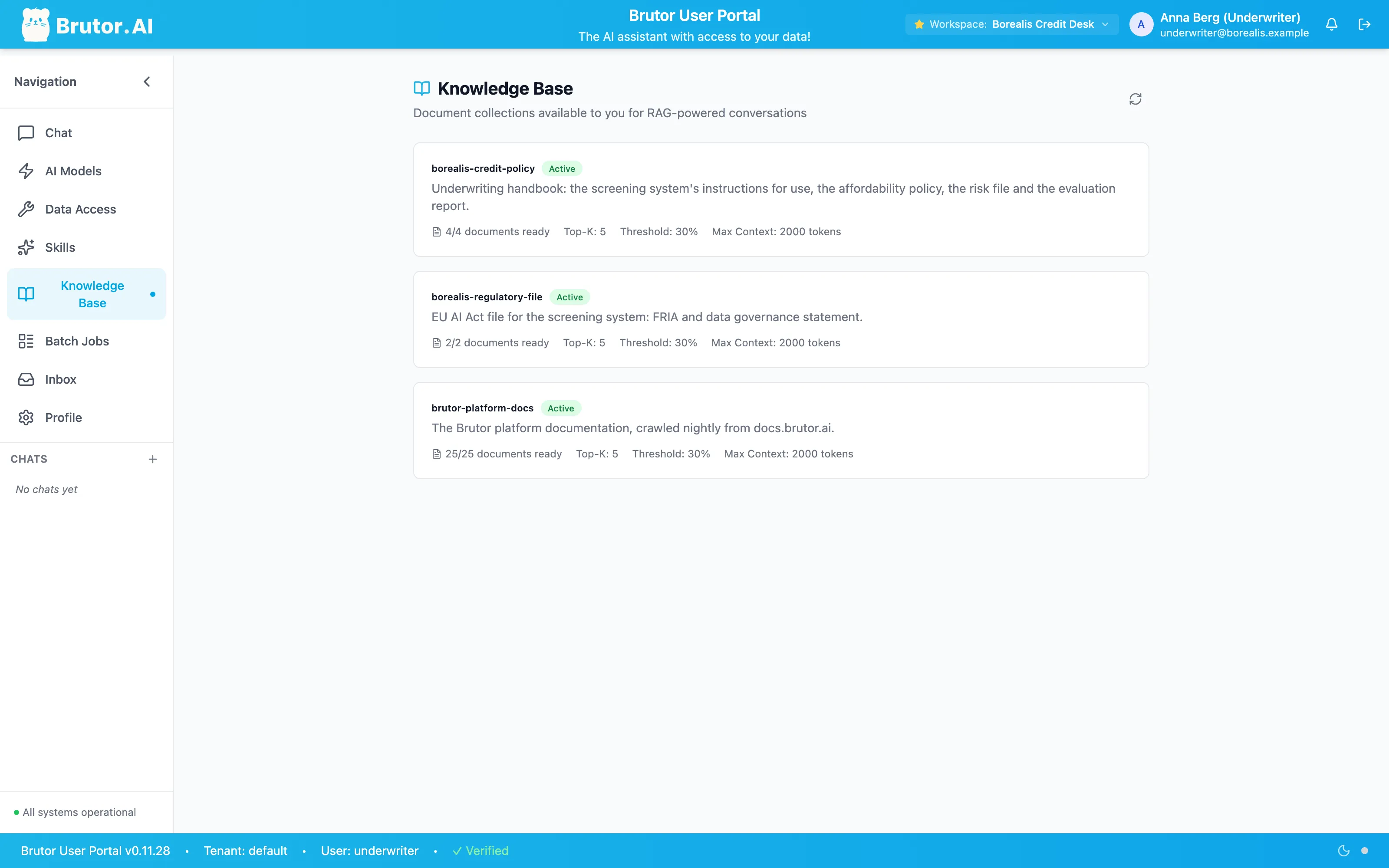
Section titled “The Knowledge Base tab”The portal’s Knowledge Base entry in the left navigation lists the collections available in the active workspace: name, Active/Disabled badge, description, ready / total documents ready, Top-K, Threshold (as a percentage) and Max Context tokens, with a Refresh button. It is read-only: no search, upload or document view. An empty list reads No Knowledge Bases Available.
Portal API for custom clients
Section titled “Portal API for custom clients”Building your own chat client (guide)? These Core Proxy endpoints take the
portal JWT (POST /v1/portal/auth/login) and X-Tenant-ID.
| Method | Path | Purpose |
|---|---|---|
| GET | /v1/portal/knowledgebases |
Collections the user can reach (?group_id=…&enabled_only=true) |
| GET | /v1/portal/knowledgebases/{collection_id} |
One collection, access-checked |
There is deliberately no portal search or upload endpoint: retrieval only happens inside governed chat calls, and content is managed by admins.
curl -s "http://localhost:8100/v1/portal/knowledgebases?group_id=group-01M61N36QYK1HVPN41KAE35PHP&enabled_only=true" \ -H "Authorization: Bearer $PORTAL_JWT" \ -H "X-Tenant-ID: default"import requests
r = requests.get( "http://localhost:8100/v1/portal/knowledgebases", headers={"Authorization": f"Bearer {PORTAL_JWT}", "X-Tenant-ID": "default"}, params={"group_id": active_workspace_id, "enabled_only": "true"},)collections = r.json()["collections"]const qs = new URLSearchParams({ group_id: activeWorkspaceId, enabled_only: "true" });const res = await fetch(`http://localhost:8100/v1/portal/knowledgebases?${qs}`, { headers: { Authorization: `Bearer ${portalJwt}`, "X-Tenant-ID": "default" },});const { collections, total } = await res.json();Response 200:
{ "collections": [ { "id": "01K8ZQ3V7M2T4N6P8R0S2U4W6Y", "name": "sales-playbooks", "description": "EMEA sales enablement", "enabled": true, "top_k": 5, "similarity_threshold": 0.75, "max_context_tokens": 2000, "document_count": 12, "ready_count": 12, "created_at": "2026-10-28T09:12:03.418211Z", "updated_at": "2026-10-28T09:12:03.418211Z" } ], "total": 1}| Parameter | Default | Example | Effect |
|---|---|---|---|
group_id |
none | group-01M61N36QYK1HVPN41KAE35PHP |
Restrict to one of the user’s direct groups; a group the user is not a direct member of returns an empty list |
enabled_only |
true |
false |
Include disabled collections |
GET /v1/portal/knowledgebases/{collection_id} returns one object with the same fields, or
404 {"error": "Collection not found or access denied"} when it does not exist or the user’s
groups do not reach it.
Source identities
Section titled “Source identities”Users whose collections include connector content can review and unlink their source
identities through /v1/portal/kb-identities; creating a link is an admin, SCIM or SSO
operation. See Source permissions.
The User Portal does not have a screen for this; it is available to custom clients.